

Appearance
Webhooks
Webhooks run in two directions. Outgoing subscriptions deliver Truetask events to a URL you own, and incoming endpoints give another system a URL it can call to start an automation here.
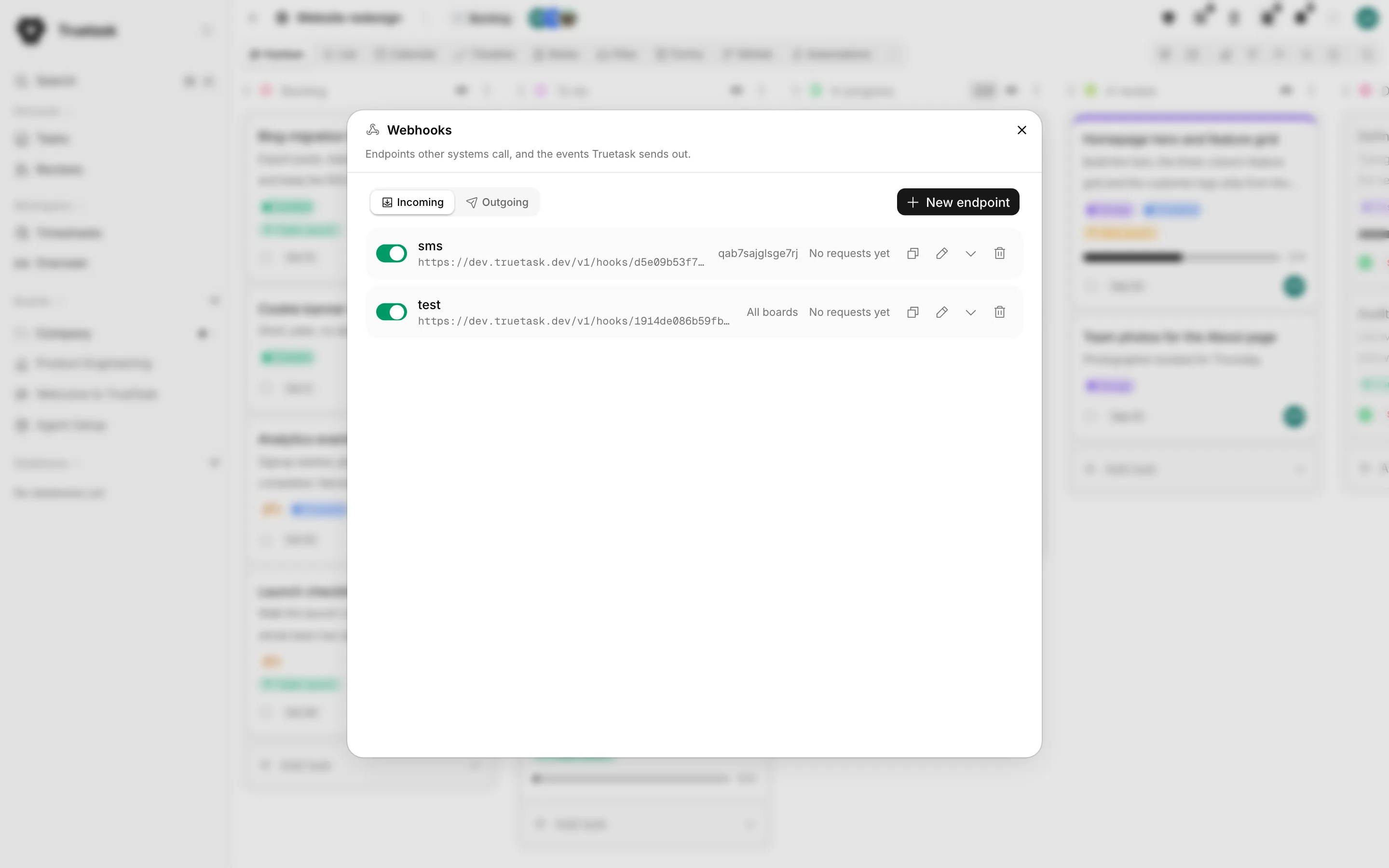
Both live in one place. Open the App menu (the grid button before your avatar) and choose Webhooks, or go to Settings > Integrations > Webhooks. The view opens on Incoming and has an Outgoing tab beside it.
Truetask Cloud only
Saved webhooks, in either direction, need a paid plan on Truetask Cloud. See Plans and billing.
Outgoing webhooks
Creating a subscription
Switch to Outgoing and click New webhook.
| Field | What it does |
|---|---|
| Name | What the row is called in the list |
| Endpoint URL | Where deliveries go, with a method picker for POST, PUT or PATCH |
| Signing secret | The shared secret deliveries are signed with, with a button that generates a random one |
| Events | The events to subscribe to, grouped, with Select all and Select none |
| Boards | Which boards' events to receive; leave it empty for every board |
| Authentication | How Truetask authenticates to your receiver: None, Bearer token, Basic auth or Header |
The signing secret and the authentication credentials are write-only. Once saved they are never shown again, and leaving the field blank on an edit keeps the stored value.
The API also accepts a headers object for extra static headers; first-class authentication wins over a header of the same name.
Who can subscribe to what
Workspace owners and admins can subscribe to any boards, or leave Boards empty to receive the whole workspace. Anyone else must name at least one board they belong to.
Membership is checked again at delivery time, not just at save time. A subscription created by a member stops receiving a board's events the moment they leave that board.
Owners and admins see every subscription in the workspace, each labelled with who created it. Everyone else sees only their own.
The delivery
Every delivery is a JSON body with the same envelope:
json
{
  "id": "5g2k9h1m3n8p7q4r-w1e2r3t4y5u6i7o8",
  "event": "card.completed",
  "timestamp": "2026-09-10T16:20:22.801Z",
  "data": { }
}
id is the delivery id, unique per delivery and identical on every retry, so a deduplication step can key on it safely. timestamp is when the event happened, ISO 8601 in UTC. data is the record the event describes, and the event name also travels in an X-Webhook-Event header.
data is enriched before it goes out, so a receiver does not have to call back for names. A task event carries the human key, a link to the task, board and list names, member and tag names, priority name, start and due dates and a description excerpt beside the raw ids. A comment, checklist or timer event carries the task key, title and link as well as the ids. Agent events carry the agent as {id, name}, the run status and the task it belongs to.
The signature
When a subscription has a signing secret, every delivery carries:
X-Truetask-Signature: sha256=<hex HMAC-SHA256 of the raw body, keyed with the secret>Verify against the raw bytes you received, before parsing, and compare in constant time.
A second header, X-Webhook-Signature, carries a plain SHA-256 of the body concatenated with the secret. It is the legacy scheme, kept only for receivers written before the HMAC header existed. Verify X-Truetask-Signature in anything new.
Delivery, retries and logs
Deliveries do not run on the request that caused them. Events are queued and drained in the background, so a slow receiver never slows the app down.
A delivery is retried only when the failure looks transient: a timeout, a connection error, or a 5xx from your receiver. Up to five attempts are made, spaced roughly 60 seconds, then 2 minutes, then 5 minutes, then 30 minutes apart. A 4xx is treated as your receiver rejecting the request, which a retry would only repeat, so it is logged once and dropped. Each attempt has a 10 second timeout.
Expand a row in the list to see its subscribed events and its last delivery attempts with the event, status code and time. GET /v1/webhooks/{id}/logs returns the same 25 attempts with the exact body that was sent and the first part of your receiver's answer. The mark on the row itself is the last delivery's outcome, so a failing subscription is visible without opening it.
Testing
The paper plane button on a row sends a webhook.test payload through the saved subscription, credentials, signature and all, and logs the attempt like a real delivery.
Two API routes help an automation platform set itself up:
POST /v1/webhooks/{id}/samplefinds the newest real record for one of the subscription's events and delivers it about a second later, as a genuine delivery in the live shape. This is how a "listen for a test event" step gets real data without waiting for something to happen. It answers 404 when the workspace has no such record yet.GET /v1/webhooks/samples?event=<name>returns recent items in the delivery shape without sending anything.
GET /v1/webhooks/events lists every event with its summary and the fields its data carries.
Which URLs are allowed
A webhook URL must start with http:// or https:// and must not contain a # fragment. The fragment rule catches a common copy and paste mistake: some receiver services show a browser dashboard URL with a fragment and the real receiver URL at the top of the page.
A URL that resolves to localhost, an internal name or a private address is refused when you save it, where you can read why, rather than failing silently at every delivery. Deliveries never follow redirects.
Self-hosted only
An instance that genuinely posts to your own intranet can allow it with Allow private network targets in Settings > General > Network. See Network.
The event catalog
There are 35 events, in these families:
| Family | Events |
|---|---|
| Tasks | created, updated, deleted, completed, reopened, assigned, unassigned, moved |
| Comments | comment added, comment deleted |
| Checklists | item completed, item uncompleted |
| Lists | created, deleted |
| Board members | added, removed |
| Tags | created, deleted |
| Timers | started, stopped |
| Questions | question asked, question answered |
| Agents | kickoff delivered, kickoff expired, handoff, needs input, blocked, stalled, done proposed, approved, returned, completed, failed, cancelled |
| Audit | audit log entry |
Every event name and every payload field is listed in Webhook events.
Incoming endpoints
An incoming endpoint is a URL you hand to an outside system. When it posts, Truetask starts the automations subscribed to that endpoint.
Creating an endpoint
Only workspace owners and admins can create one. On the Incoming tab click New endpoint.
| Field | What it does |
|---|---|
| Name | What the row is called, and the actor name a run is attributed to |
| Authentication | None, a Header name and value, or Basic username and password |
| Methods | The HTTP verbs the URL accepts; a new endpoint is POST-only |
| Boards | Which boards may subscribe to it; leave it empty to let every board subscribe |
| Accept files | Whether the endpoint also takes multipart/form-data, and how many files a request may carry |
An endpoint belongs to the workspace, not to a board. Boards is an allowlist of who may subscribe, so deleting a board never deletes the endpoint.
Anyone with the URL can trigger it
The URL is the only thing standing between the internet and your automations. Add a header or basic secret whenever the sender can send one.
The URL
The endpoint's URL is <workspace>/v1/hooks/<random path>. Copy it from the row with Copy URL.
Regenerate URL mints a new path. The old URL stops working immediately, so update every sender before you do it.
Using it in an automation
On a board, open the Automations view and add an Incoming webhook trigger. Pick the endpoint from the list: it offers the endpoints whose allowlist permits this board, and marks a paused one. A workspace owner or admin also gets a New endpoint button right there. Anyone else with no endpoint available is told to ask a workspace admin to make one.
Everything the request carried is then available to the steps after the trigger:
| Placeholder | What it holds |
|---|---|
{webhook.name} | The endpoint name |
{webhook.method} | The HTTP method used |
{webhook.body} | The raw body |
{webhook.body.<field>} | One field of a JSON or form body |
{webhook.query.<param>} | One query string parameter |
{webhook.header.<name>} | One request header |
{webhook.ip} | The sender's IP |
{webhook.files}, {webhook.files_count} | The names and the count of the files the request carried |
Only a short list of request headers is kept and exposed (content-type, user-agent, x-request-id, x-delivery-id), so an authentication header can never leak into a log or a placeholder.
The trigger's configuration panel shows the last request it received, so you can copy a placeholder straight from a real payload instead of guessing field names.
Testing an endpoint
The row's Send a request panel shows a ready example to copy, and, when the endpoint accepts GET, a Test in browser link. Values after the ? in the URL arrive as query fields the automation can read.
POST /v1/webhooks/incoming/{id}/trigger fires an endpoint as the signed-in caller, with no public URL and no external credential. Owners and admins may call it for any endpoint; anyone else must be a member of a board the endpoint allows. This is how the n8n node starts a Truetask workflow.
Request log and limits
Recent requests lists what arrived, with the outcome of each: Accepted, Auth failed, Method not allowed, Unsupported body, Too large, Rate limited, Files refused or Paused. The log records the body, never file bytes.
| Limit | Value |
|---|---|
| Requests per minute, per endpoint and sender | 120 |
| Body size | 1 MB, or 25 MB for an endpoint that accepts files |
| Files per request | 5 by default, up to 20 |
The endpoint always answers fast and runs the subscribed automations afterwards, so a sender is never left waiting on your workflow. An accepted request answers 202 even when nothing is listening yet.
Signing secrets
Signing secrets are the other half of the picture: keys Truetask uses to sign calls it makes out to a runner or a gateway, so the receiver can prove the call came from your workspace. They are used by an agent workflow step's launch URL and by an automation's HTTP request node.
A secret is write-only by construction: it is encrypted at rest, and you can create, replace and delete one, but nobody can read it back, including the person who set it. Steps and nodes store the secret's id, never its value, which is why an id is safe to leave in workflow JSON that every board member can read.
When a call is signed, the receiver gets:
X-Webhook-Timestamp: <unix seconds>
X-Webhook-Signature-V2: <hex HMAC-SHA256 of "<timestamp>.<raw body>", keyed with the secret>
The HTTP request node extends the same idea to plain credentials: put {secret.<id>} in a header value and the id is what gets stored, with the value resolved at send time. Never put a secret in a URL or in a header you typed literally, because both are readable by anyone who can open the automation.