

Appearance
Triggers
A trigger is the one node that decides when an automation runs. Every automation has exactly one. Everything wired after it runs in order when the trigger fires.
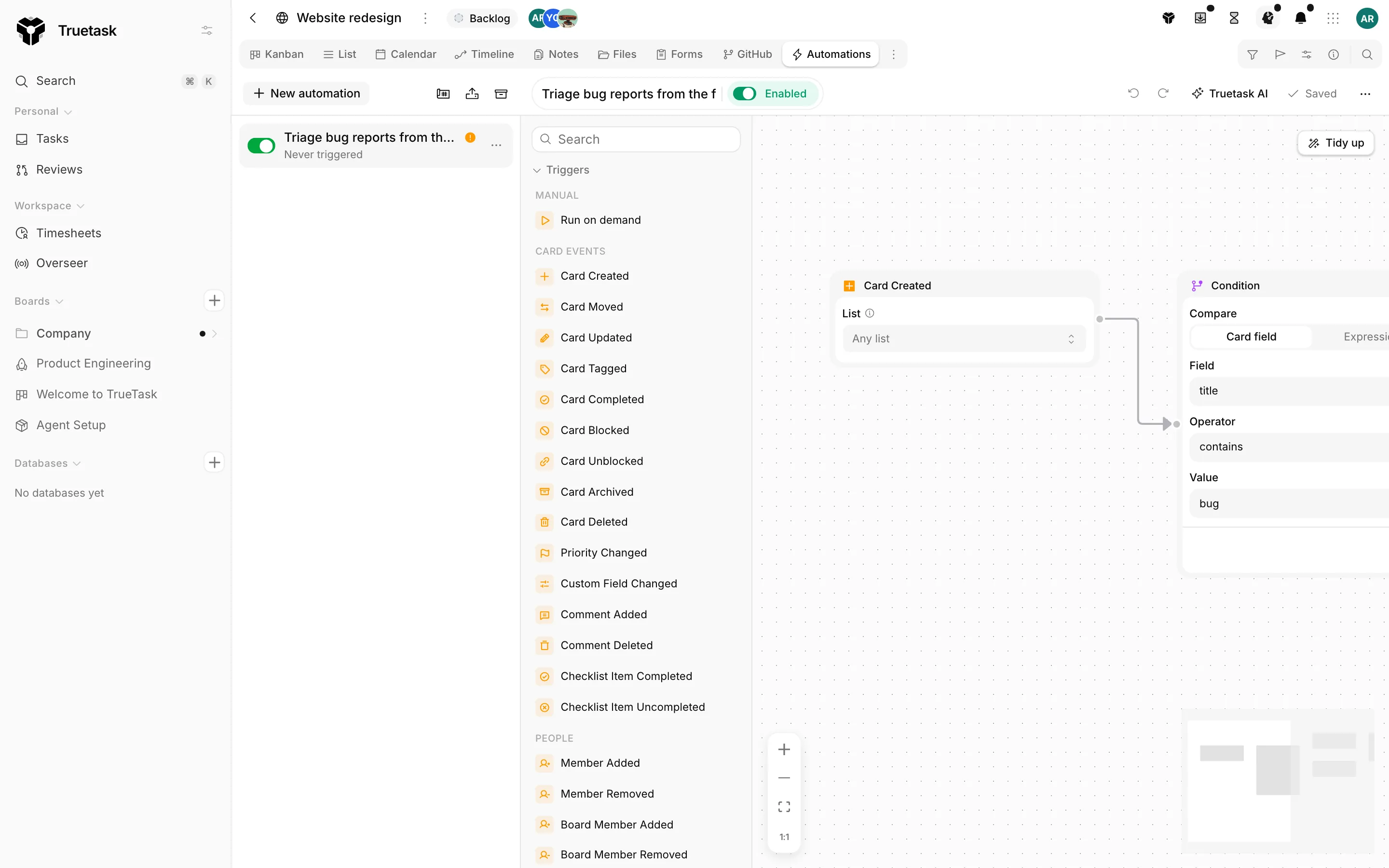
The palette groups triggers the way this page does. On a database board the entity groups are renamed (Card events becomes Record events, Board becomes Database) and the triggers that need lists, flow, notes, git or agents are not offered at all.
Manual
| Node | What it does | Options |
|---|---|---|
| Run on demand | Runs only when someone starts it by hand: the Run button in the automations list, or Run automation on a task. | Run it from (The board, or A task), Button label, Description |
The board puts a Run button in the board toolbar and runs once, with no task attached. A task puts a Run button on every task, and the run works on the task you clicked. The label shows in the Run menu, and the description is the hover help next to it.
Card events
| Node | What it does | Options |
|---|---|---|
| Card Created | Runs when a new task is added to this board, whether typed in, sent through a form, or created by another automation. | List: one list, a flow state, or any |
| Card Moved | Runs when a task moves between lists. | From list and To list, each a mix of list names and flow states; empty means any |
| Card Updated | Runs when the task's own fields change: title, description, dates, priority and so on. | Changed fields: Title, Description, Start date, Due date, Tags, Files; none picked means any tracked change |
| Card Tagged | Runs when a tag is added to a task. | Tag name, or Any tag |
| Card Completed | Runs when a task is marked complete, or, if you flip it, when a completed task is reopened. | When completed or When uncompleted |
| Card Blocked | Runs when a task becomes blocked by a dependency that is not done yet. | None |
| Card Unblocked | Runs when the last dependency blocking a task is done. | None |
| Card Archived | Runs when a task is archived. | None |
| Card Deleted | Runs when a task is deleted, that is, moved to the trash. | None |
| Priority Changed | Runs when a task's priority changes. | Priority, or Any priority |
| Custom Field Changed | Runs when a custom field's value changes on a task. | Custom field, required |
| Comment Added | Runs when someone comments on a task. | None |
| Comment Deleted | Runs when a comment is removed from a task. | None |
| Checklist Item Completed | Runs when a checklist item is ticked. | None |
| Checklist Item Uncompleted | Runs when a checklist item is unticked. | None |
A list selector accepts list names and flow states together. Picking the flow state Done matches any list in the Done lane, so the automation survives a rename or a board clone. See Board flow.
Card Completed means the task moved into a Done-category list. Uncompleted means it moved back out.
People
| Node | What it does | Options |
|---|---|---|
| Member Added | Runs when someone is assigned to a task. | Member, or Any member |
| Member Removed | Runs when someone is unassigned from a task. | Member, or Any member |
| Board Member Added | Runs when a person joins this board. | Member, or Any member |
| Board Member Removed | Runs when a person leaves this board. | Member, or Any member |
On a database, Member Added and Member Removed read Owner Assigned and Owner Removed, because a record has one owner where a task has assignees.
Board
| Node | What it does | Options |
|---|---|---|
| Board Status Changed | Runs when the board's status changes in the board details. | From status and To status, each a mix of status names and status kinds; empty means any |
| Board Details Updated | Runs when the board's details change: name, summary, icon, dates or visibility. | Changed fields: Name, Summary, Icon, Start date, End date, Visibility |
| Board Field Changed | Runs when a board-level custom field changes its value. | Board field, required |
| Board Date Arrives | Runs when the board's start or end date arrives, or a set number of days before or after it. | Board date (Start date or End date), When (On the date, Days before, Days after), Days |
| List Created | Runs when a list is added to this board. | None |
| List Deleted | Runs when a list is removed from this board. | None |
| Tag Created | Runs when a tag is created on this board. | None |
| Tag Deleted | Runs when a tag is deleted from this board. | None |
Board statuses and board fields are workspace-level: one value per board, edited in the board details panel. See Boards and Custom fields.
Agents
| Node | What it does | Options |
|---|---|---|
| Agent Handoff | Runs when an agent hands a task over to a person or to another agent. | Member: only fire for handoffs to this agent, or Any |
| Agent Run Status | Runs when an agent run ends or stalls. | Run outcomes: Completed, Failed, Blocked, Needs input, Stalled, Cancelled; none picked means every outcome |
These pair with the Kick off Agent action to chain agent work. See Delegating work to agents.
Notes
| Node | What it does | Options |
|---|---|---|
| Note Created | Runs when a note is created. | Folder, or Any folder |
| Note Updated | Runs when a note's content changes. | Applies to: Any note, Notes in a folder, or A specific note |
| Note Commented | Runs when someone comments on a note. | Applies to: Any note, Notes in a folder, or A specific note |
| Note Published | Runs when a note is published to a public link. | Publication scope: Any, Whole board, Folder, Single note, Selection; plus the Note when the scope is a single note |
| Note Deleted | Runs when a note is deleted. | Applies to: Any note, Notes in a folder, or A specific note |
A folder filter matches the folder and everything under it. Note Created, Note Updated and Note Commented ignore events an automation caused, so an automation that writes notes cannot set itself off. See Notes and Publishing notes.
Time
| Node | What it does | Options |
|---|---|---|
| Due Date Reached | Runs when a task's due date arrives, a number of hours before it, or once it is overdue. | When (On due date, Before due date, After due date), plus Hours before or Hours after due date |
| Scheduled Trigger | Runs on a clock: hourly, daily, weekly or monthly. | Frequency, Day of week or Day of month, Hour, Minute, Timezone, and an optional manual Run button |
| Milestone Approaching | Runs a set number of days before a milestone's date. | Days before milestone |
| Milestone Reached | Runs when a milestone's date arrives. | None |
| Timer Started | Runs when someone starts a timer on a task. | None |
| Timer Stopped | Runs when a timer on a task stops. | None |
Scheduled trigger
The timezone defaults to the workspace's, and the panel shows the next run in that zone so a daylight-saving change never surprises you. A schedule is just a clock: it runs once for the board, with no task in focus. To act on many tasks, put a For Each or a Target Card node after it and do the filtering there.
Run it by hand too adds a Run button alongside the schedule, on the board or on every task, for the times you need it early. A saved, clean automation also gets a Test run button in the trigger's panel.
A sleeping workspace can miss a tick
If the workspace sleeps after a period without activity, a scheduled run can be late or skipped. The trigger panel says so when that applies.
Milestone triggers
A milestone trigger fires once per milestone and carries no task. Use Send Email, HTTP Request or Create Card after it, or add a Target Card or For Each step first to reach the tasks around the milestone. See Milestones.
Integrations
| Node | What it does | Options |
|---|---|---|
| Incoming webhook | Runs when an external system posts to one of the workspace's incoming endpoints. | Endpoint: pick an existing one or create a new one |
| Text received | Runs when a text reaches the workspace's Twilio number. | Start on (Replies to this board's texts, or Any text to the number), Number |
| WhatsApp received | Runs when a WhatsApp message reaches the workspace's number. | Start on (Replies to this board's messages, or Any message to the number) |
The request body, query string and headers of an incoming webhook are available to every node after it. The endpoint picker shows the last request it received, so you can see the field names before you write a placeholder. Endpoints are workspace-wide and are managed in the Webhooks dialog; see Webhooks.
Text received and WhatsApp received only appear once that service is connected. A reply to a message this board sent lands on the task it answers, and that task becomes the focus of the run. See Messaging integrations.
Git
Every git trigger needs a repository linked to the board. The PR and CI triggers take an optional Target branch filter, which accepts a * glob such as release/*, so "merged to main" and "merged to staging" can be separate automations.
| Node | What it does |
|---|---|
| PR opened | Runs when a pull request linked to a task is opened in the connected repository. |
| Review requested | Runs when a review is requested on a linked pull request. |
| PR approved | Runs when a linked pull request is approved. |
| Changes requested | Runs when a reviewer requests changes on a linked pull request. |
| CI failed | Runs when CI fails on a linked pull request. |
| CI passed | Runs when CI passes on a linked pull request. |
| CI started | Runs when CI starts on a linked pull request. |
| PR merged | Runs when a linked pull request is merged. |
| PR closed | Runs when a linked pull request is closed without being merged. |
| Commit pushed | Runs when a commit that references a task is pushed. |
| Issue opened | Runs when an issue is opened in the connected repository. |
| Issue closed | Runs when a linked issue is closed. |
| Issue reopened | Runs when a linked issue is reopened. |
| Issue labeled | Runs when a label is added to a linked issue. |
See Git integration and Git and tasks.