

Appearance
Overseer
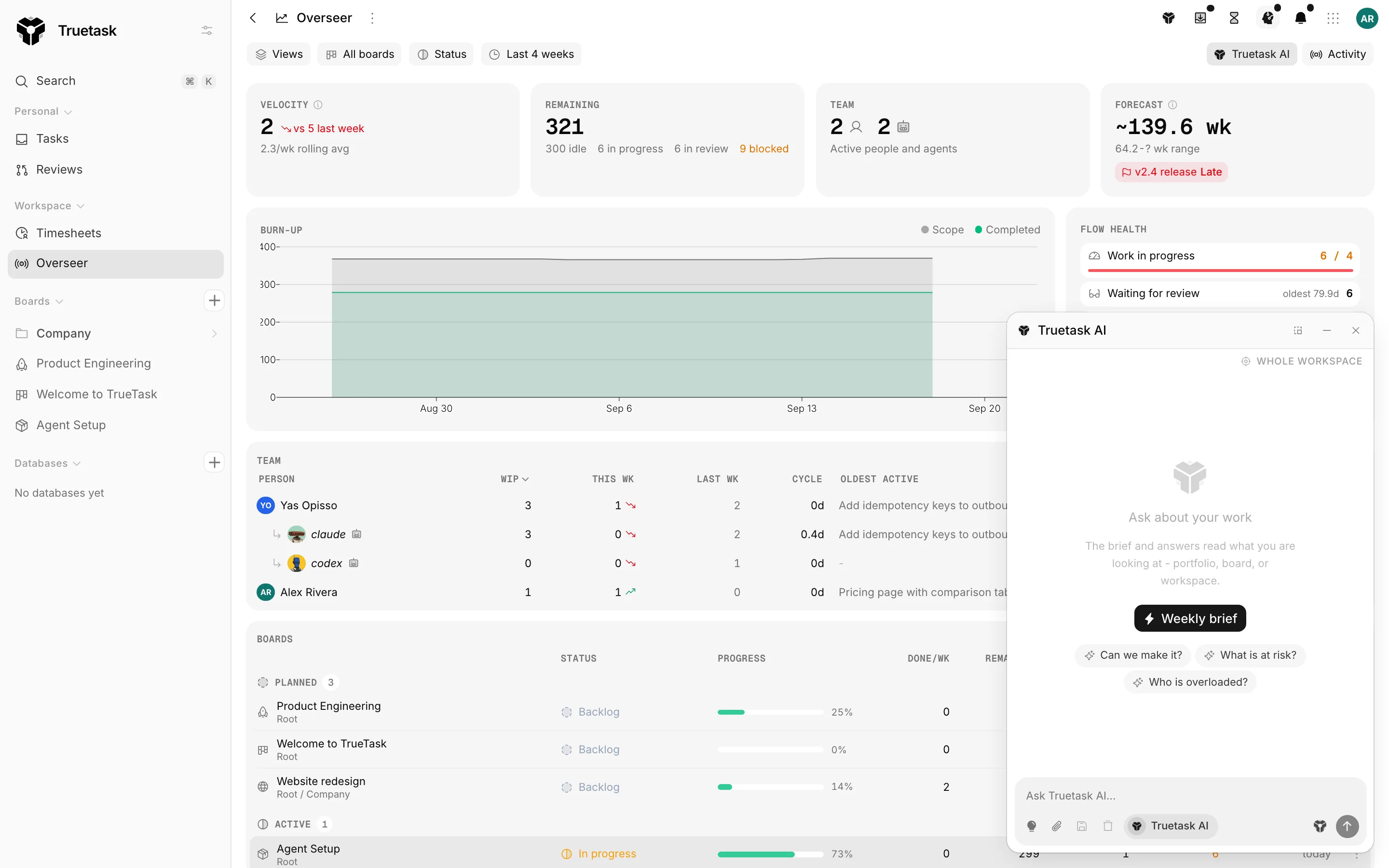
Overseer is the view across boards. It answers the questions you cannot answer from inside one board: are we going to make it, what is stuck, who is carrying too much, and what changed this week.
Who sees it
Overseer appears in the sidebar under Workspace for site OWNER and ADMIN, and only when the Overseer feature is on in your Features dialog.
The page itself is scoped to the boards you are a member of, so what it counts is only ever work you already have access to.
Scope and saved views
The toolbar sets what the page is looking at.
| Control | What it does |
|---|---|
| Boards | All boards, or an explicit selection. Search to find one. |
| Status | Narrows the board rows by status kind: planned, active, paused, done, cancelled. |
| Time range | Last week, Last 2 weeks, Last 4 weeks, Last 8 weeks, Last quarter or Last 6 months. |
| Views | Saves and recalls a board selection. |
| Activity | Shows or hides the activity rail. |
Once you have a selection you like, save it under Views. Saved views are listed under My views, and views other people share appear under Shared with me.
On a view you can Make default so Overseer opens on it, Share with workspace to publish it to everyone, Rename it, and Delete view. When you change the selection of a saved view, Overseer marks it Selection changed and offers to update it.
Very large workspaces
On a very large workspace some of the sweeps behind these numbers hit their cap. When that happens Overseer says so in a banner, and the view is partial.
The headline
Four numbers across the top.
| Tile | What it means |
|---|---|
| Velocity | Tasks completed per week, Monday to Sunday UTC, across the boards in scope. A task counts once, in the week of its latest completion. The arrow compares this week against last week, the sub-line is the average of the last three full weeks. |
| Remaining | Open work, split into idle, in progress, in review and blocked. |
| Team | Active people and agents in the window. |
| Forecast | Remaining work divided by the three-week rolling completion rate, plus a range taken from the best and worst of the last six full weeks. |
When there is not enough history yet, Forecast says No velocity signal yet.
If the boards in scope have a milestone, the forecast also carries a chip comparing it against the nearest milestone due date: On track, At risk or Late. See Milestones.
Burn-up
The burn-up chart draws Scope against Completed over the selected range, so a line that flattens while scope climbs is scope creep you can point at.
It is built from daily snapshots, so a new workspace sees "Collecting daily snapshots, the chart appears after two days of data" until there is something to draw.
Flow health
Flow health is the queue view: Work in progress against the configured limit, Waiting for review, and Blocked, each with the age of the oldest item.
Under it, Aging WIP lists the in-progress tasks that have sat longest. When nothing has gone stale it says so instead.
WIP limits come from the board's lanes. See Board flow.
Team
The team table is one row per person or agent who was active in the window.
| Column | What it shows |
|---|---|
| Person | The person or agent. |
| WIP | What they have in progress right now. |
| This wk / Last wk | Completions in each week. |
| Cycle | Their cycle time in days. |
| Oldest active | The age of their oldest open task. |
| Blocked | How much of their work is blocked. |
Agents appear here beside people, because delegated work is still work moving through the board.
Boards
Below that, one row per board: Status, Progress, Done/wk, Remaining, WIP, Blocked and Last activity. A board with pipelines running says so, and calls out any that need a human.
Click a row to focus Overseer on that board, and every number above narrows to it. Open board goes to the board itself.
Boards whose status kind is done or cancelled are grouped under Finished and left out of the portfolio totals.
Board statuses
The statuses a board can be in are a workspace vocabulary, edited by an owner or admin in Settings > General > Board statuses.
Each status has a name, an icon, a colour and a kind, and the kind is what Overseer reads. Renaming a status therefore cannot change what it means.
| Kind | What Overseer does with it |
|---|---|
| Planned | Not started yet. Counts toward the portfolio like an active board until work begins. |
| Active | Work is under way. These boards make up the portfolio numbers. |
| Paused | On hold. Flagged as paused and still counted in the portfolio numbers. |
| Done | Finished. Grouped apart from active boards and left out of the portfolio totals. |
| Cancelled | Stopped and will not finish. Grouped with finished boards and left out of the totals. |
One status is the default for new boards, and the default can never be a finished kind. Deleting a status that boards are using makes you pick the status they move to.
A board's own status is set from Board details.
Hiding a board
Some boards are noise in a portfolio view. Use Board actions on a row and choose Hide from Overseer.
Hidden boards collect under Hidden boards, with Show in Overseer to bring one back.
You can also drive this from an automation. The Set Board Visibility action shows or hides the board on the Overseer portfolio, so you can, for example, hide a board automatically once its status becomes Completed. See Actions and logic.
The activity feed
Activity in the toolbar opens a rail down the right side with everything happening across the boards in scope, grouped by day and updating live.
Filter it by board, by person and by time range (Last hour, Today, Last 7 days, Last 30 days, All time), and clear all three at once.
Entries name what happened and where: created, updated, deleted, moved, archived, exported, imported and commented on, against tasks, lists, boards, tags, members, comments and dependencies. Agents are labelled as agents and background jobs as System, so an unattended change is never mistaken for a person. Clicking an entry offers to open the task in its board, or just go to the board.
The rail is resizable, and Truetask remembers whether you had it open.
The brief and the assistant
The assistant rail writes a Weekly brief of what you are looking at, and answers questions about it.
It reads the current scope, so the same question gives a portfolio answer, a board answer or a workspace answer depending on what you have selected. Starter questions include "Can we make it?", "What is at risk?" and "Who is overloaded?".
This needs AI to be available in the workspace. When it is not, the rail says so and the rest of Overseer works as normal. See Truetask AI.