

Appearance
Forms
A form is a way to create a task on a board without opening the board. It has two audiences: a public page anyone with the link can fill in without an account, and a dialog your own team fills in inside Truetask.
Every submission lands as a task in the list you choose, with the form recorded on it so you always know where it came from.
Open a board and pick Forms in the view tab strip.
Creating a form
| Action | Where |
|---|---|
| New form | The Forms view's rail header |
| New form | The Views menu while the Forms view is open |
| Create intake form | The board page menu, under Board setup |
You need board Editor or Admin to create or edit a form. Board Viewers can open the Forms view and use the public link, but cannot change anything.
The Forms view
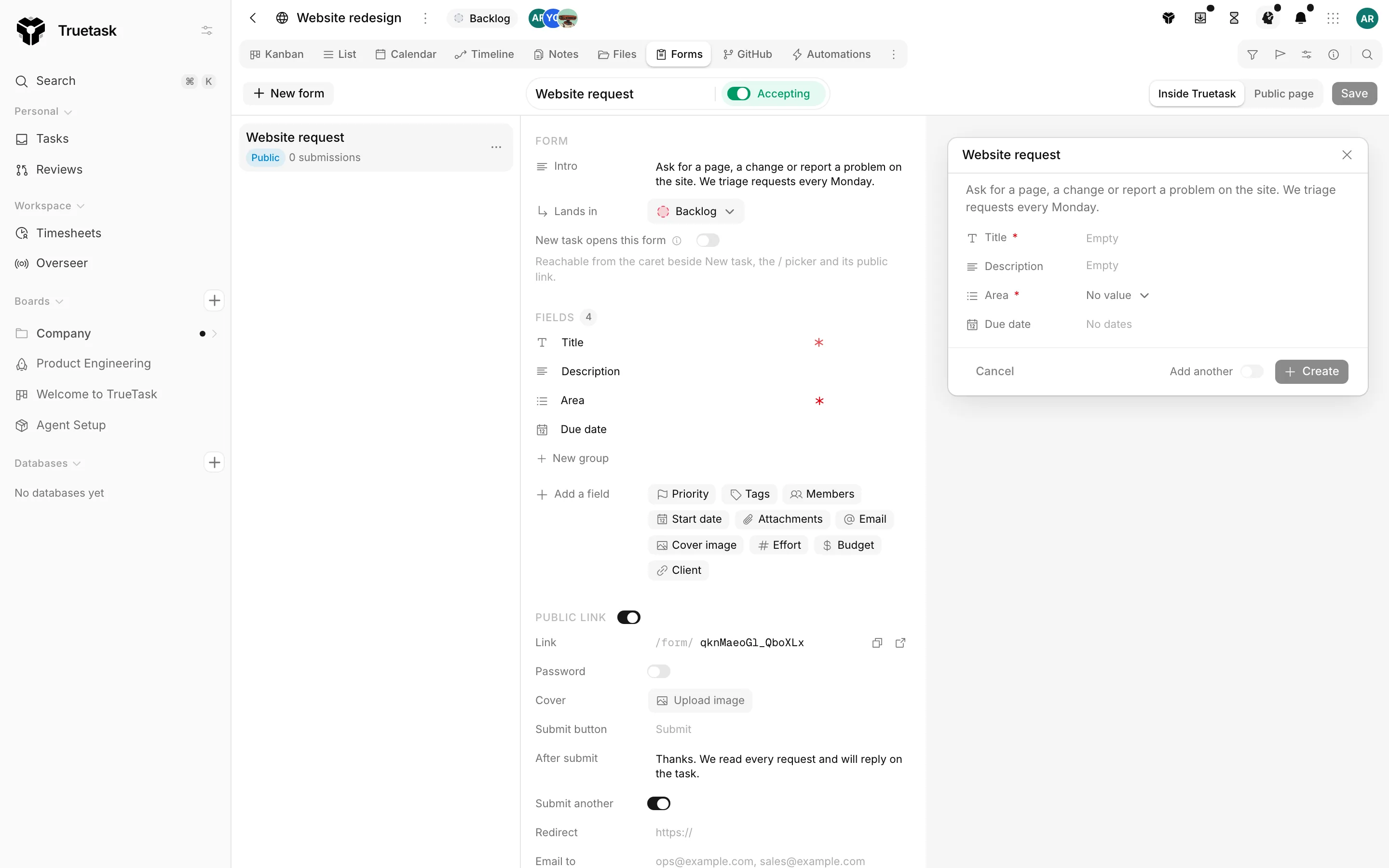
The view has three columns: the rail of forms, the settings pane, and a live preview.
The rail
One row per form, with its name, its badges and its submission count.
| Badge | Meaning |
|---|---|
| Public | The public link is on. A padlock means the link is password protected |
| Default | This is the form the board's add button opens |
| Inactive | The form is paused and accepts nothing |
The kebab on a row, and a right-click anywhere on it, opens the same menu.
| Action | What it does |
|---|---|
| Open page | Opens the public page in a new tab |
| Copy link | Copies the public URL |
| Duplicate | Clones the form with a fresh link, no password and zero counters, named "Copy of ..." |
| Activate / Deactivate | Turns submissions on or off |
| Automate this form | Opens the automation templates that run on a submission |
| Delete | Removes the form |
Deleting keeps the submissions
Deleting a form does not touch the tasks it already created. Its URL starts returning 404.
The toolbar
The form's name is on the left, with the Accepting / Paused switch beside it. A paused form opens nowhere: not its link, not the board's add button.
On the right, the preview switches between Inside Truetask and Public page so you can see both framings of the same form. Changes are held as a draft until you press Save, and Cancel throws them away.
The settings pane
Four sections, in order.
| Section | What it holds |
|---|---|
| Form | The intro, the list submissions land in, and whether the board's add button opens this form |
| Fields | The rows submitters fill in |
| Public link | The URL, the password, the cover, the submit button and what happens after a submit |
| Submissions | Views, submissions, conversion and the most recent tasks the form created |
See Building a form for every setting, and Sharing and submissions for the public side.
Under the Form section, one line always says where this form currently opens from, so you never have to guess.
Forms inside Truetask
Every form is also available as a dialog in the app. That is how a form stops being only an intake channel and becomes the way your team creates tasks with the right fields filled in.
Turn on New task opens this form and the board's add affordances open it instead of the inline title field: New task on the list bar, a column's add row on the Kanban, and a day on the Calendar. Only one form per board can be the default, so turning it on turns it off everywhere else. The rest of the board's forms stay one click away, under the add button's caret and in the / picker.
Where that dialog opens is a personal preference, not a form setting. Open the view Preferences popover on a board and set Forms open as to a popover, a floating frame, a centered dialog or the side panel. The default follows how you open tasks on that view.
Forms on a database
Database boards have a Forms view too. There the form creates a record rather than a task, the board default setting reads New record opens this form, and Add record on the list bar opens it.
A record's relation pickers can also open a form: when a relation field points at a database, its picker can create the missing record through that database's form.
See Databases.
Forms for agents and the API
A form is also a shape an agent can fill. forms_runtime returns everything needed to render a form: its field specs, its groups, its picklists, its board and its target list. forms_submit then creates the task or record with every value validated and coerced against the field's type, which is safer than writing the fields one by one.
The created task carries the same provenance a public submission gets, and the submission counter and notification emails behave the same way. The submitter needs Editor access to the form's board.
See MCP connector and REST API.