

Appearance
Sharing and submissions
A form with its public link on is reachable at /form/<slug> on your workspace address. No account, no sign-in.
Copy the URL from the Public link section of the builder, or from Copy link in the rail's row menu.
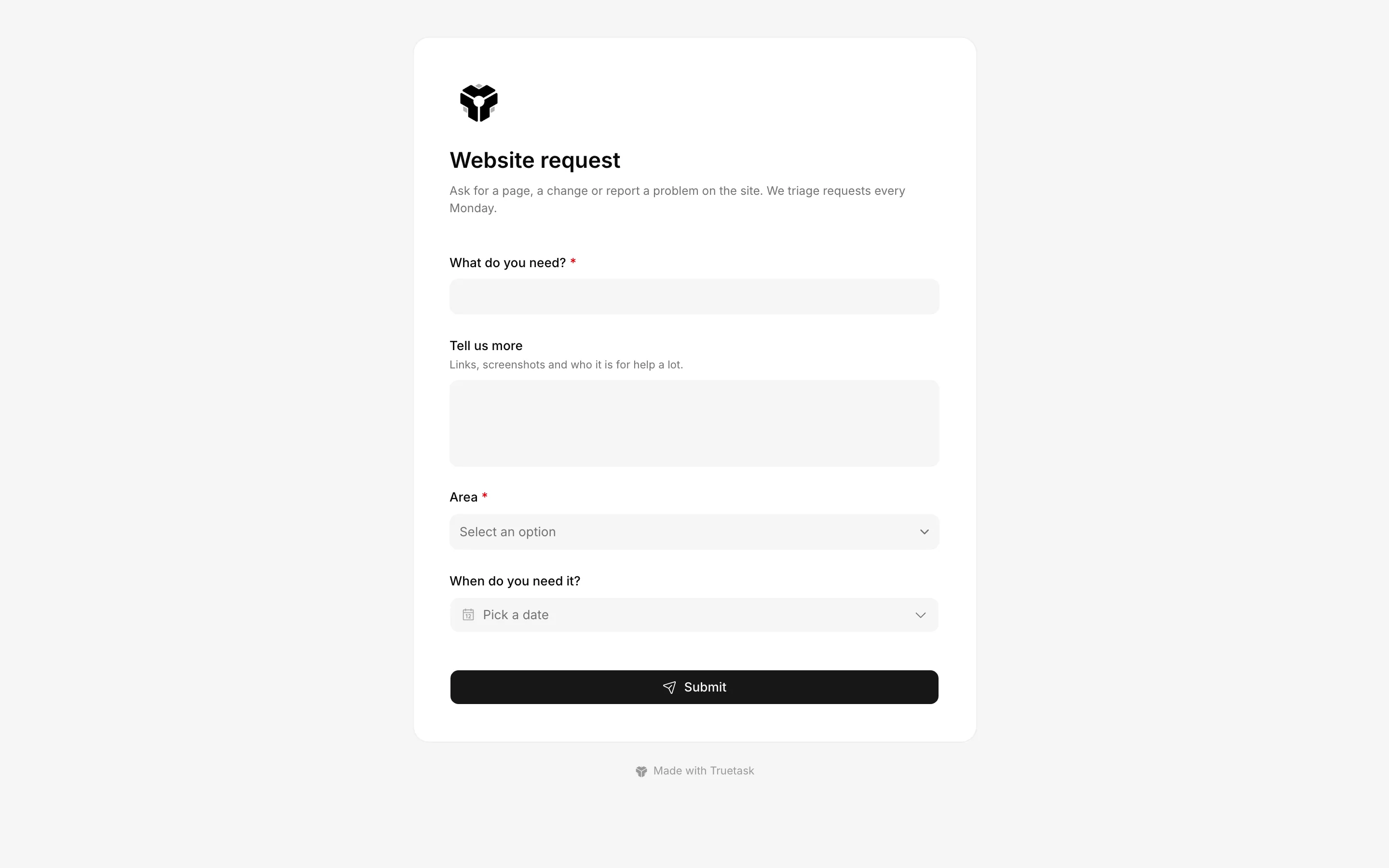
What a submitter sees
The page draws the form's cover banner, your workspace logo, the form's title and its intro, then the fields. Folded fields sit behind one Show more fields row. The submit button carries whatever text you gave it, and a quiet "Made with Truetask" line sits below the form.
Cmd/Ctrl+Enter files the form from anywhere in it.
If something required is missing, the page scrolls the offending row into view and puts the message under it. Email fields are checked for a plausible address and URL fields are canonicalized, so example.com becomes https://example.com/.
A form whose link is off, or that is paused, answers 404. The page then says Form not found.
People fields stay inside Truetask
Members and user fields render only in the in-app dialog, never on the public page. Put them on a form you use internally rather than one you hand to strangers.
Password
Turn the password on and the page shows a Protected form gate first: one field, one Continue button. The password is a single shared one, not per person.
A correct password sets a short-lived cookie, so the submitter is remembered for 30 minutes and can file more than once without retyping it. A wrong one says Incorrect password. and nothing else.
Prefilled links
Any field can be prefilled or hidden through the URL, which is what makes a form usable as a per-customer or per-campaign link.
| Parameter | What it does |
|---|---|
?prefill_title=Broken+login | Fills the title |
?prefill_description=... | Fills the description |
?prefill_<field_key>=... | Fills that field. Multi-value fields take a comma-separated list |
?hide_<field_key>=1 | Hides the field entirely |
A hidden field is not required and is not submitted.
Files and pictures
An attachments row lets submitters upload files.
| Limit | Value |
|---|---|
| Size | 25 MB per file |
| Count | 10 files per submission by default |
| Types | Images, PDFs, text and Office documents, and zip archives |
Inline-renderable types such as .html, .svg, .xml and .js are always refused. Files are served from your own workspace address, so one of those uploaded by a stranger and later opened by a teammate would be a cross-site scripting vector. An upload of a blocked type is rejected with a message that lists what is accepted.
A picture row (a task's cover image, or a record's picture) takes PNG, JPG, WebP or GIF up to 10 MB, and the submitter crops it before filing. The picture lands on the task right after the submission creates it.
Self-hosted only
Both limits are configurable: FORMS_MAX_FILES_PER_SUBMISSION changes the per-submission count, and FORMS_UPLOAD_ALLOWED_EXTENSIONS changes the allowlist. The always-blocked types are subtracted from any override, so a permissive list cannot reopen the hole.
Spam control
Truetask uses no CAPTCHA. Two quieter mechanisms do the work instead.
- A honeypot field a human never sees. A bot that fills every input trips it, and the submission is silently dropped. The bot gets a success response, so it never learns the trap.
- A per-IP rate limit of 20 submissions per hour per form. Over the limit, the page says Too many submissions. Try again later.
Neither is visible to a real submitter.
Truetask Cloud only
Truetask Cloud also caps form submissions per calendar month across the workspace, according to your plan. See Plans and billing. Self-hosted instances have no cap.
What a submission creates
One task, in the form's Lands in list, with the values the submitter typed and the files they uploaded.
The task records the form it came from, so you can always tell form intake apart from work someone created by hand. A submission filed from inside Truetask also records the member who filed it.
If the form's target list has been deleted since, the submission goes to the board's first open list. If the board has no list at all, the submitter is told to ask the form's admin to point it at a current list.
After a submit
Three things can happen, in this order of precedence.
- Redirect is set: the submitter leaves for that URL.
- Otherwise the thank-you panel appears with your message, or with "Your submission has been received." when you left it blank.
- Submit another on the panel resets the form for a second submission, unless you turned that off.
If you set Email to, every submission also emails those addresses with the form's name and the new task's title. That needs working outgoing mail: see SMTP on a self-hosted instance.
Automating submissions
A submission creates a task, so the trigger that fires on a newly created task fires on a submission too. Filter the automation by the form's target list to keep it to that form's intake.
Automate this form in the rail's row menu does that filtering for you. It offers two ready-made automations already pointed at the form's list: Tag and prioritize submissions, and AI-enrich submissions, which has an AI step fill in a description from the title.
See Automation triggers and Automation templates.
Turning a form off
Deactivate pauses a form. The link 404s, the board's add button stops opening it, and existing tasks are untouched. Activate brings it back with the same URL.
Delete removes the form for good. The tasks it already created stay exactly where they are; only the URL stops working.