

Appearance
SMTP Self-hosted
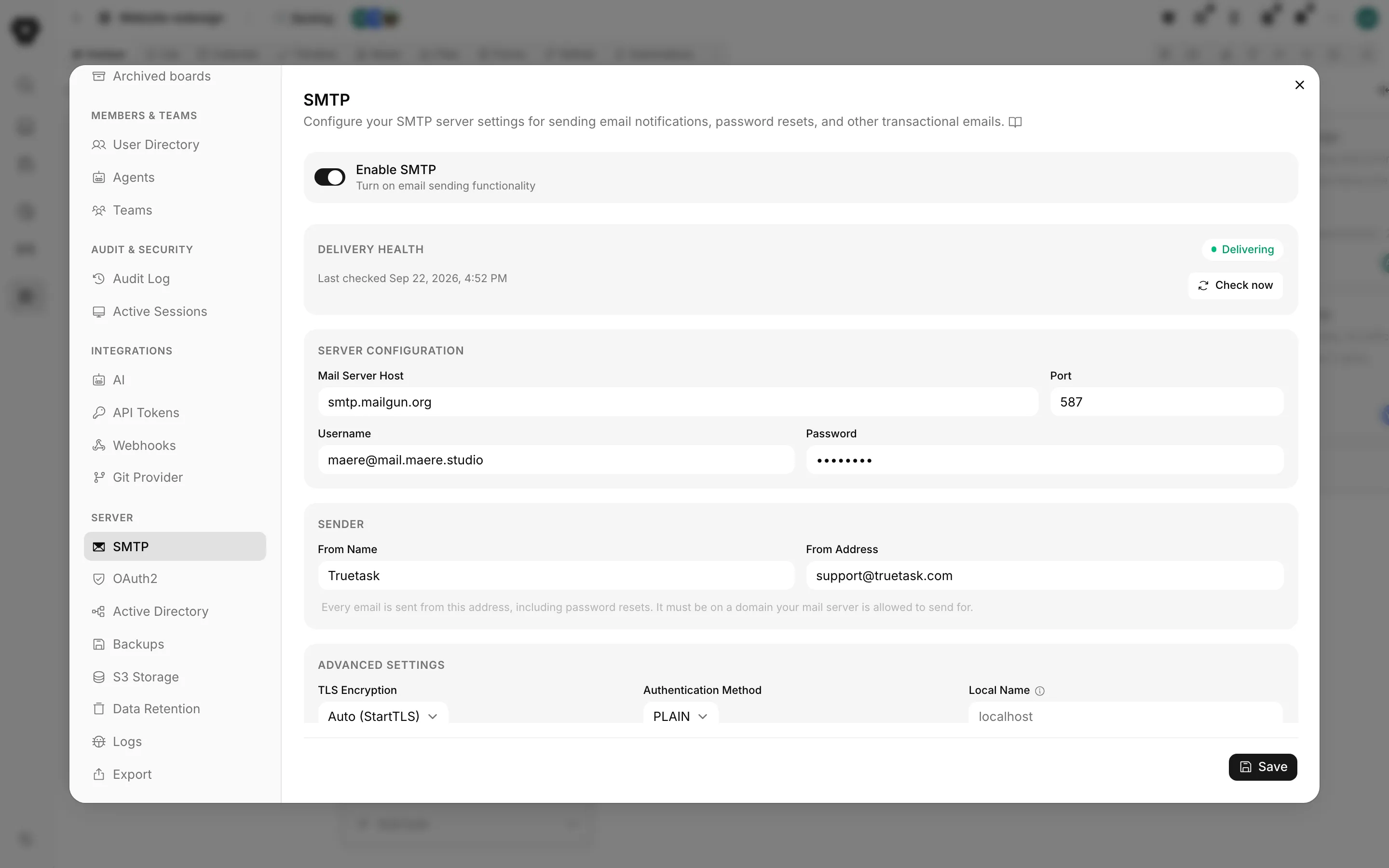
Truetask sends transactional mail through an SMTP server you provide. Configure it in Settings > Server > SMTP, or in .env before the first start.
What needs email
Without a working mail server these stop working:
- Password resets and the branded reset confirmation page.
- Sign-in codes, if you use one-time-code sign-in.
- Workspace and board invitations.
- Notifications delivered by email, and board digests.
- Form submission notifications from public forms.
- License reminders: the trial-expired notice and the 7-day updates-window warning that go to owners and admins.
- The automation Send email action, which the node palette itself flags as needing outgoing mail.
Everything else keeps working. Email is not on the critical path for the app itself.
Configure the server
Turn Enable SMTP on, then fill in the server block.
| Setting | What it does |
|---|---|
| Mail Server Host | The SMTP host, for example smtp.example.com |
| Port | Usually 587 for STARTTLS or 465 for implicit TLS |
| Username | Optional, if your provider needs no authentication |
| Password | Optional, same |
Sender
| Setting | What it does |
|---|---|
| From Name | The display name on every message. Defaults to Truetask |
| From Address | The address every message is sent from, including password resets |
The pane spells out the constraint: "It must be on a domain your mail server is allowed to send for."
Do not leave the sender at the placeholder
PocketBase's factory sender is [email protected]. Mail sent from it is rejected on arrival by anything that enforces DMARC, and the pane raises a specific warning when it sees that address. The instance tries to help by deriving noreply@<your domain> from your public URL at first start, but a bare IP or example.com leaves the placeholder in place. Set a real address here.
Advanced settings
| Setting | Options | What it does |
|---|---|---|
| TLS Encryption | Auto (StartTLS), Always | Auto (StartTLS) connects in the clear and upgrades, which is right for port 587. Always connects with TLS from the first byte, which is right for port 465 |
| Authentication Method | PLAIN, LOGIN | Pick whichever your provider accepts |
| Local Name | free text | The domain sent in the EHLO/HELO greeting |
There is no way to turn encryption off entirely. Auto and Always are the only two choices.
Local Name matters more than it looks. Some servers, the Gmail SMTP relay among them, reject a greeting that says localhost and want a real domain name.
Send a test email
Under Test Connection, type an address and press Send test email. A success toast means the message left the server. A failure toast carries the reason, with your credentials stripped out of it.
The test sends a real message, so use an inbox you can read.
Delivery health
Above the configuration, Delivery health tells you whether mail is actually going out.
| Status | Meaning |
|---|---|
| Delivering | The last check completed a full handshake |
| Not delivering | The last check or the last real send failed. The scrubbed reason is shown |
| Disabled | SMTP is switched off |
| Not checked yet | No probe has run. The next automatic check runs within 15 minutes |
The probe is not a test email. It connects, greets the server, upgrades to TLS, authenticates and hangs up without delivering anything, so the monitor never fills an inbox. It runs every fifteen minutes, and again whenever you save the pane or send a test. Check now runs it on demand.
When delivery is failing, every admin who can open this pane sees an amber banner at the top of the app: "Email isn't being delivered. Password resets, invites and notifications are failing to send.", with a Check email settings link. Only a confirmed failure raises it. A status of "Not checked yet" means unmeasured, not broken, and never shows the banner.
Configuring from .env instead
Setting POCKETBASE_SMTP_HOST in .env configures mail at boot. The setup wizard offers this during installation.
| Variable | Default |
|---|---|
POCKETBASE_SMTP_HOST | empty |
POCKETBASE_SMTP_PORT | 587 |
POCKETBASE_SMTP_USERNAME | empty |
POCKETBASE_SMTP_PASSWORD | empty |
POCKETBASE_SMTP_SENDER_NAME | Truetask |
POCKETBASE_SMTP_SENDER_ADDRESS | empty |
The environment wins at every start
When POCKETBASE_SMTP_HOST is set, the whole block is reapplied from the environment on every container start, and TLS is reset to Auto (StartTLS). Changes you make in the pane are overwritten the next time the container restarts. Pick one place and stay there. If you want to manage SMTP from the app, leave POCKETBASE_SMTP_HOST empty in .env.
Changing these variables needs a restart to take effect. Changes made in the pane apply immediately.
Common providers
Ports and hosts you are likely to need. Check your provider's own documentation; these change.
| Provider | Host | Port | TLS | Notes |
|---|---|---|---|---|
| Mailgun | smtp.mailgun.org | 587 | Auto (StartTLS) | Username is the full SMTP login, not your account email |
| SendGrid | smtp.sendgrid.net | 587 | Auto (StartTLS) | Username is literally apikey |
| Amazon SES | email-smtp.<region>.amazonaws.com | 587 | Auto (StartTLS) | SMTP credentials are separate from your AWS keys |
| Postmark | smtp.postmarkapp.com | 587 | Auto (StartTLS) | Server token as both username and password |
| Google Workspace | smtp.gmail.com | 587 | Auto (StartTLS) | Set a real domain in Local Name, not localhost |
| Microsoft 365 | smtp.office365.com | 587 | Auto (StartTLS) | The sender must be a mailbox the account may send as |
Truetask Cloud only
Mail is handled for you on Truetask Cloud, and the SMTP pane is not shown.