

Appearance
Install Self-hosted
Installing Truetask is three commands: log Docker in to the image registry, run the setup wizard, start the stack. The wizard writes your .env and can start the containers for you.
You need Docker and Docker Compose v2 on the host, and a Gitea access token for git.truetask.dev with the read:packages scope, which comes from your Truetask portal account. OpenSSL is optional but recommended: the wizard uses it to generate your push-notification keys and your settings encryption key.
1. Log Docker in to the registry
bash
docker login git.truetask.devUse your Gitea username and the access token as the password. The setup wizard can do this for you instead, so you can skip it and answer its first question.
2. Get the release repository
bash
git clone https://git.truetask.dev/truetask/truetask-releases.git
cd truetask-releases
The repository is deliberately thin: docker-compose.yml, the setup wizard, the Caddy entrypoint, the management scripts and a VERSION file. There is no application source and nothing is built on your host, because docker compose up -d pulls pre-built images.
Clone it rather than downloading a zip. Updating is a git pull in this directory, and the new checkout is what pins the new image tag.
3. Run the setup wizard
bash
./build_env.shThe wizard checks for Docker, Docker Compose and OpenSSL, then walks you through five sections. If it finds an existing .env, either next to the script, at the path recorded in .truetask-data-path, or in the default ../data directory, it offers to load those values as defaults so you can re-run it to reconfigure an instance.
Registry access
| Prompt | Default | Notes |
|---|---|---|
Log Docker in to git.truetask.dev now? | Yes | Answer no if you already ran docker login |
| Registry host | git.truetask.dev | |
| Gitea username | ||
| Gitea token (read:packages) | Read from the terminal without echoing |
A failed login is reported but does not stop the wizard. You can retry with docker login git.truetask.dev afterwards.
Basic configuration
Data directory. Default ../data, relative to the repository. It must be outside the application directory so your data survives updates. The wizard resolves it to an absolute path, prints that path back, and refuses to continue until it can write there. It then creates pb_data and mcp_config inside it. If you run the wizard with sudo, it also runs chown -R 1000:1000 on the directory, because PocketBase runs as UID 1000 inside its container. A directory that already contains pb_data is recognized as an existing install; a directory with unrelated files raises a warning and asks you to confirm. You also get a warning if the filesystem has less than 1 GB free.
Workspace name. Default truetask-prod. Lowercase letters, numbers, hyphens and underscores only, starting with a letter or a number. This becomes the Docker Compose project name and the container name prefix, so a second instance on the same host needs a different one. The wizard warns you if a compose project with that name is already running.
Public URL. Default https://your-domain.com. The wizard strips any protocol you type and adds one back: http:// for localhost and 127.0.0.1, https:// for everything else. A trailing slash is removed. If the result is exactly http://localhost and your proxy port is not 80, the port is appended. This URL is what PocketBase puts in email links and OAuth redirects, so it has to be the address people actually use.
Proxy port. Default 80. This is the host port published by the Caddy container. The wizard warns if something is already listening there.
Admin email and Admin password. The email defaults to [email protected] and must look like an address. The password must be at least 10 characters and contain an uppercase letter, a lowercase letter and a digit, and you type it twice. This is the PocketBase superuser and your first sign-in to the app.
Email (SMTP)
Optional. Answer no and configure mail later in the app instead; see SMTP.
If you answer yes, the wizard asks for the host, the port (default 587), the username, the password, a sender name (default Truetask) and a sender address (default noreply@ plus the domain from your public URL).
Push notifications
Web push needs a VAPID key pair. With OpenSSL present the wizard offers to generate one and defaults to yes. It creates a prime256v1 key, derives the URL-safe base64 public key from it, and asks for a claim email (default mailto:admin@ plus your domain).
Keys are permanent
Once the instance has a database, the wizard locks the existing VAPID keys and will not regenerate them. Replacing them would break every push subscription your users have already made.
Without OpenSSL this section is skipped and web push stays off.
Security
Settings encryption. Recommended, and the default is yes on a fresh install. The wizard generates a 32-character hex key and writes it to PB_ENCRYPTION_KEY. PocketBase then starts with --encryptionEnv=PB_ENCRYPTION_KEY and encrypts the sensitive settings it stores in the database, such as your SMTP password, OAuth2 client secrets and S3 keys.
The encryption key cannot change
Change or lose this key after the first start and the encrypted settings become unreadable. Store it with your other secrets. If a database already exists, the wizard preserves the key it finds and will not let you switch encryption on or off.
API rate limiting. Recommended, default yes. Writes POCKETBASE_RATE_LIMIT_ENABLED=true, which turns on PocketBase's rate limiter at boot.
Summary and start
The wizard prints the data directory, workspace, public URL, port, admin email, and whether encryption, email, push and rate limiting are on. Then it writes .env, copies it to <data directory>/.env as a backup, and records the data directory path in .truetask-data-path.
Finally it offers to start the server. Answer yes and it runs docker compose up -d, waits, and reports the state of all five services.
4. Start the stack and sign in
If you skipped the last prompt:
bash
docker compose up -dOpen your public URL, sign in with the admin email and password from the wizard, and activate your license within three days.
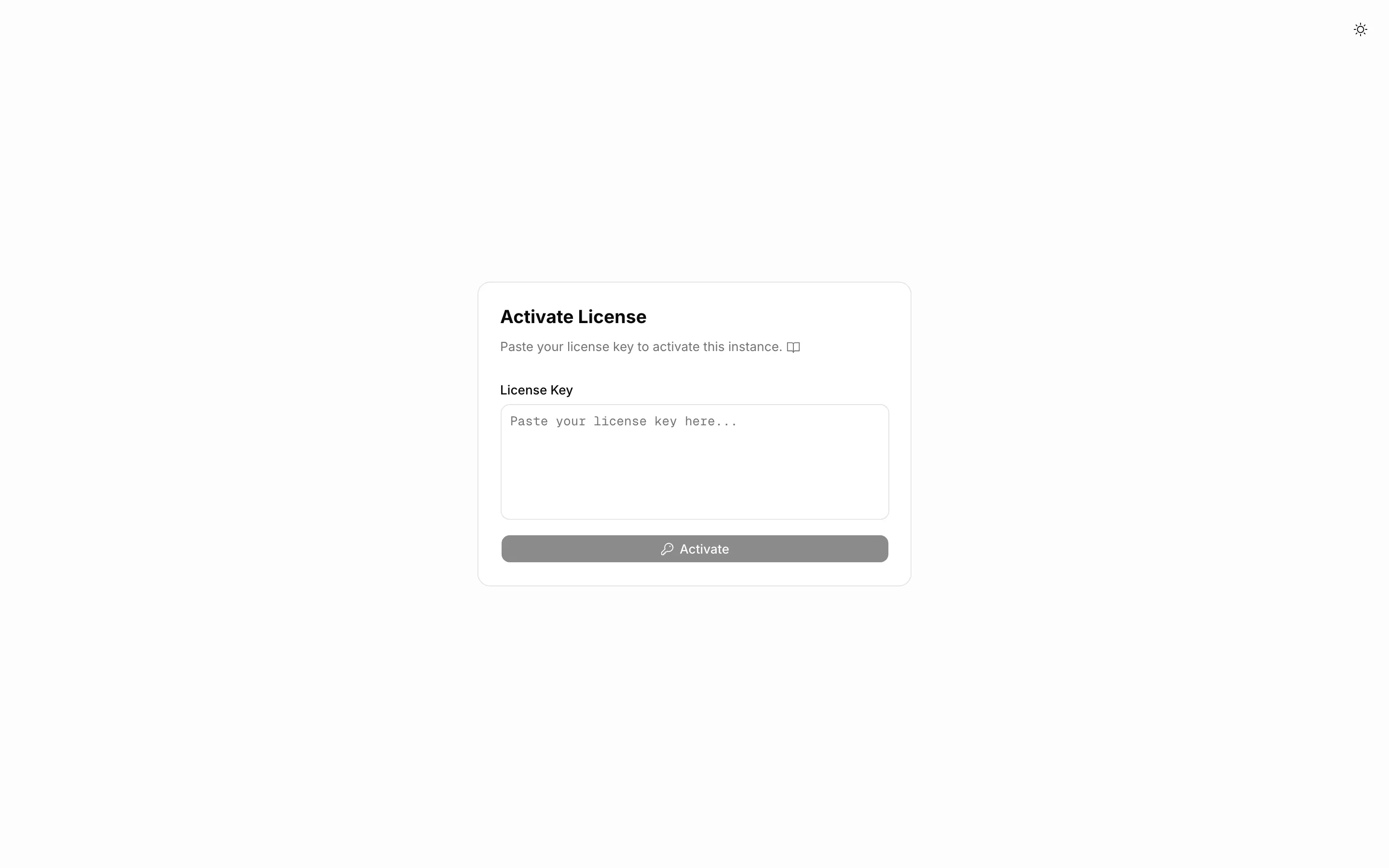
The key arrives by email. Paste it on this page, or later in Settings > Site > License. No restart is needed. See License for what happens during and after the grace period.
The .env reference
These are the variables the wizard writes.
| Variable | Default | What it does |
|---|---|---|
DATA_DIR | ../data | Where pb_data, logs and mcp_config live on the host |
WORKSPACE | truetask-prod | Compose project name and container name prefix |
PUBLIC_URL | The address people use. Email links and OAuth redirects are built from it | |
PROXY_PORT | 80 | Host port published by the Caddy container |
PB_ENCRYPTION_KEY | generated | Encrypts sensitive settings at rest. Empty disables encryption |
POCKETBASE_ADMIN_USERNAME | Superuser email, re-synced into the database at every start | |
POCKETBASE_ADMIN_PASSWORD | Superuser password, re-synced at every start | |
POCKETBASE_SMTP_HOST | empty | Mail server. When set, the SMTP block below is applied at every start |
POCKETBASE_SMTP_PORT | 587 | |
POCKETBASE_SMTP_USERNAME | empty | |
POCKETBASE_SMTP_PASSWORD | empty | |
POCKETBASE_SMTP_SENDER_NAME | Truetask | |
POCKETBASE_SMTP_SENDER_ADDRESS | empty | |
POCKETBASE_RATE_LIMIT_ENABLED | true | Turns on PocketBase's rate limiter |
VAPID_PRIVATE_KEY | generated | Web push private key, PEM with escaped newlines |
VAPID_PUBLIC_KEY | generated | Web push public key |
VAPID_CLAIM_EMAIL | mailto:admin@<domain> | Web push contact address |
IBM_TELEMETRY_DISABLED | true | Opts a third-party build-time tool out. Truetask itself sends nothing |
SITE_MODE | HOSTED | Runtime mode. Leave it on HOSTED |
The compose file reads a few more that the wizard does not write. Add them by hand when you need them.
| Variable | Default | What it does |
|---|---|---|
TRUETASK_VERSION | the tag of your checkout | Image tag to pull. Normally leave it alone and let git pull move it |
TRUETASK_REGISTRY | git.truetask.dev/truetask | Registry the images come from |
POCKETBASE_ADMIN_ENABLED | false | Exposes the PocketBase admin dashboard at /_/. Keep it off in production |
UNSPLASH_APP_ID, UNSPLASH_ACESS_KEY, UNSPLASH_SECRET_KEY | empty | Your own Unsplash keys for covers. Also needs the Network opt-in |
FORMS_UPLOAD_ALLOWED_EXTENSIONS | empty | Comma-separated extensions, no dots, for anonymous form uploads |
FORMS_MAX_FILES_PER_SUBMISSION | 10 | |
FORMS_TOKEN_SECRET | empty | Signs the password gate cookie on protected public forms. Falls back to the admin password |
Keep the backup
The wizard copies .env into your data directory. After an update that replaces the application directory, copy it back with cp <data directory>/.env .env.
Reverse proxy and TLS
The Caddy container is the only one with a published port. It listens on port 80 inside the container with auto_https off, so it does not terminate TLS. Put your own TLS terminator in front of it: another Caddy, nginx, Traefik, a load balancer or a tunnel, pointed at <host>:<PROXY_PORT>.
Inside, Caddy routes by path:
| Path | Goes to |
|---|---|
/v1/* | FastAPI |
/agent-setup.md | FastAPI, rewritten to /v1/agent-setup.md |
/mcp and /mcp/* | The MCP server |
/yjs and /yjs/* | The collaboration server |
/api/realtime | PocketBase, with response buffering disabled |
/api/* | PocketBase |
/_/* | PocketBase when POCKETBASE_ADMIN_ENABLED=true, otherwise a 404 |
| everything else | PocketBase, which serves the web app |
Two things your own proxy must respect. /api/realtime is a server-sent event stream, so it must not be buffered, and Truetask's internal Caddy already sets Cache-Control: no-cache, no-transform and X-Accel-Buffering: no on it for proxies that honor those. /yjs is a WebSocket, so upgrades must pass through. Without either, the app looks alive but changes only appear after a refresh.
The management scripts
scripts/management/ holds five helpers. Run them from anywhere; they find the compose file two levels up.
| Script | What it does |
|---|---|
truetask-start.sh | docker compose up -d, then prints your access URL |
truetask-stop.sh | docker compose down. With --remove it also drops images and volumes, after a confirmation. Your data directory is untouched either way |
truetask-status.sh | Version, git checkout, container states, a health probe, data directory size, backup count and free disk |
truetask-update.sh | Pulls the repository, pulls the images, recreates the containers. See Updates |
truetask-backup.sh | create triggers a backup, list lists them. See Backups |
When it goes wrong
| Symptom | What to do |
|---|---|
| Port already in use | The wizard warns at the prompt and Docker fails at up. Re-run ./build_env.sh, choose a free PROXY_PORT, and point your outer proxy at it |
| Cannot write to the data directory | The wizard refuses the path and asks again. Pick a directory you own, or create it and give yourself write access. If you install as root, remember the containers write as UID 1000 |
You lost your .env | Copy the backup out of your data directory with cp <data directory>/.env .env. The wizard also left a .truetask-data-path file next to itself holding the absolute path |
| PocketBase will not start after an update | The container runs pocketbase migrate up before serving and refuses to start if a migration fails, so it never serves traffic against an inconsistent schema. Back up pb_data and read the log for the failing migration |
When a service will not come up, the wizard names it. Read the logs, and run the stack in the foreground to watch a boot end to end:
bash
docker compose logs
docker compose up
A pull failure is almost always the registry login. Run docker login git.truetask.dev again and check the token still has read:packages.