

Appearance
Audit, sessions and logs
Four panes answer the four questions an administrator gets asked: what changed, who is signed in, why did that error happen, and is anything down.
Audit Log
Settings > Audit & Security > Audit Log records changes across the workspace.
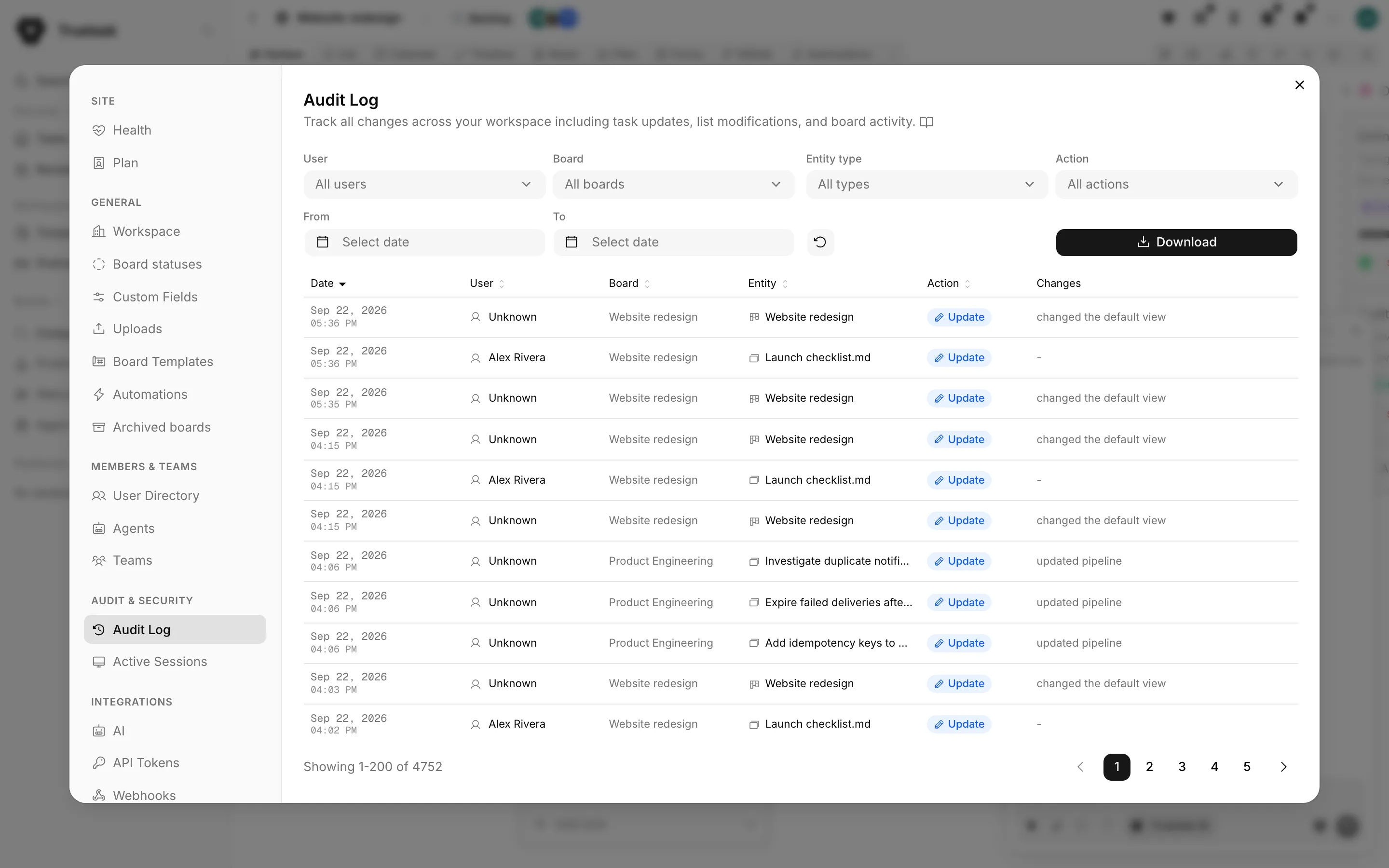
Each row carries the date, the person, the board, the entity, the action and a plain-language Changes summary. For an update, that summary is built from the stored before-and-after values, field by field, so "Priority changed" reads as the actual old and new value rather than a diff blob.
The actor is not always a person. A change made by an automation or by an agent is attributed to it by name, so an unexplained edit can be traced to the workflow that made it.
Filters
| Filter | Options |
|---|---|
| User | Any workspace member, or all users. |
| Board | Any board, or all boards. |
| Entity type | Tasks, lists, boards, tags, or system events. |
| Action | Create, Update, Delete, Move, Archive, Export, Import, LDAP Sync, LDAP Auth. |
| From / To | A date range. |
The two LDAP actions are what makes a directory sync auditable: you can see when accounts appeared and when someone signed in through the directory. See Sign-in and identity.
Exports
Five buttons, all of which export the filtered set rather than the current page:
| Export | Format |
|---|---|
| Export CSV | Plain spreadsheet rows. |
| Export JSON | The same rows, machine readable. |
| Export Excel | A formatted workbook. |
| SOC 2 Report | An HTML report with an action summary and an attestation. |
| ISO 27001 Report | An HTML report written against ISO 27001:2022 Annex A. |
Both compliance reports state the same thing: the audit log is append-only, and records cannot be modified or deleted after they are created. Each entry is hashed into a chain with the entry before it, so a changed or removed row breaks the chain and is detectable. Verification runs per board through the API, at GET /api/boards/{board_id}/audit/verify.
Truetask Cloud only
Chain verification needs a paid plan. Reading and exporting the audit log does not. See Plans and billing.
Audit as a webhook
The audit.log webhook event fires on any audited change on a board, which is how you stream the audit trail into an external SIEM instead of exporting it by hand. See Webhooks and Webhook events.
Active Sessions
Settings > Audit & Security > Active Sessions lists sign-ins with the user, the IP address, the browser and operating system, and when they signed in. Devices are typed as Desktop, Mobile, Tablet or API, so a token-driven integration is distinguishable from a person at a keyboard. The table updates live and can be filtered to one user.
Revoke signs a person out of every device at once. The dialog names the person and says they will have to sign in again.
Revoking your own sessions signs you out
The dialog warns you explicitly when the target is your own account. Confirming logs you out immediately and returns you to the sign-in page.
Logs
Settings > Server > Logs holds structured entries from the API and from the PocketBase hooks: errors, warnings and info events.
This is the pane to open when a user reports an error. Truetask shows them a reference of the form ERR-xxxxxx, and the search box matches that reference, the message and the request ID. Filter by level (Error, Warning, Info), by source, and by date range.
Opening an entry shows the request ID, the request itself, the status, the duration, the stack trace and the context, with a copy button for handing the lot to support.
Health
Settings > Site > Health is the quick answer to "is something down".
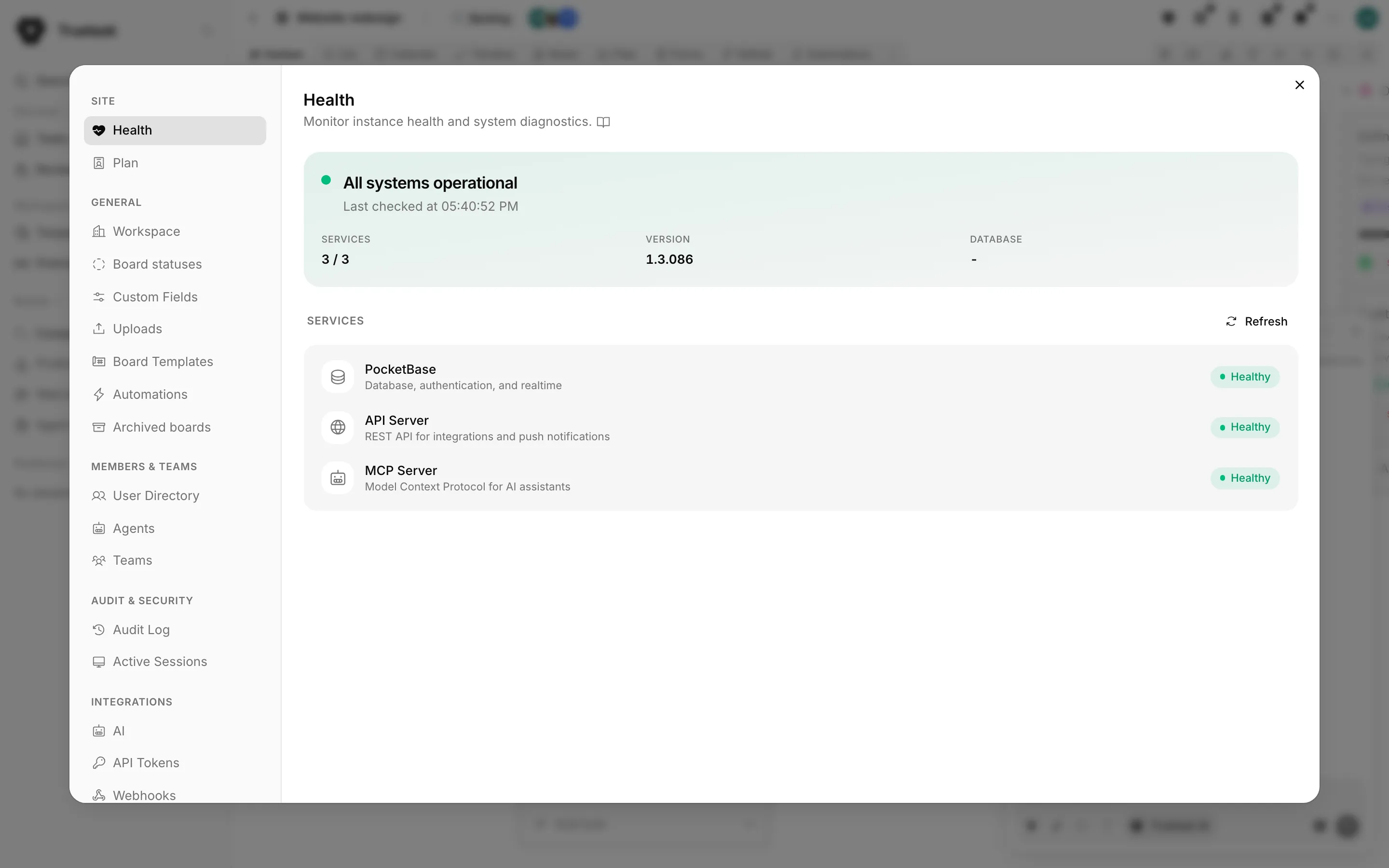
It checks three services and reports each as Healthy, Unreachable or Unknown:
| Service | What it covers |
|---|---|
| PocketBase | Database, authentication and realtime. |
| API Server | The REST API used by integrations and push notifications. |
| MCP Server | The Model Context Protocol endpoint AI assistants connect to. |
Beside them it shows the Truetask version and the database version, and the time of the last check. Refresh runs the checks again.
Self-hosted only
If a service reads Unreachable, the container behind it is the place to look. See Self-hosted overview.
Retention Self-hosted
How long audit entries, sessions, notifications, webhook logs, error logs and trashed tasks are kept is set in Settings > Server > Data Retention, and a daily cleanup job removes anything older. See Data retention.
Truetask Cloud only
Retention is managed for you and the pane is not shown.