

Appearance
Tasks page and work views
Tasks in the sidebar is one list of work across every board you belong to. Filter it by who, what and how, then save that as a view, share it and pin it. The personal view, My work, doubles as Home: it is the only one that carries the attention strip and the activity rail.
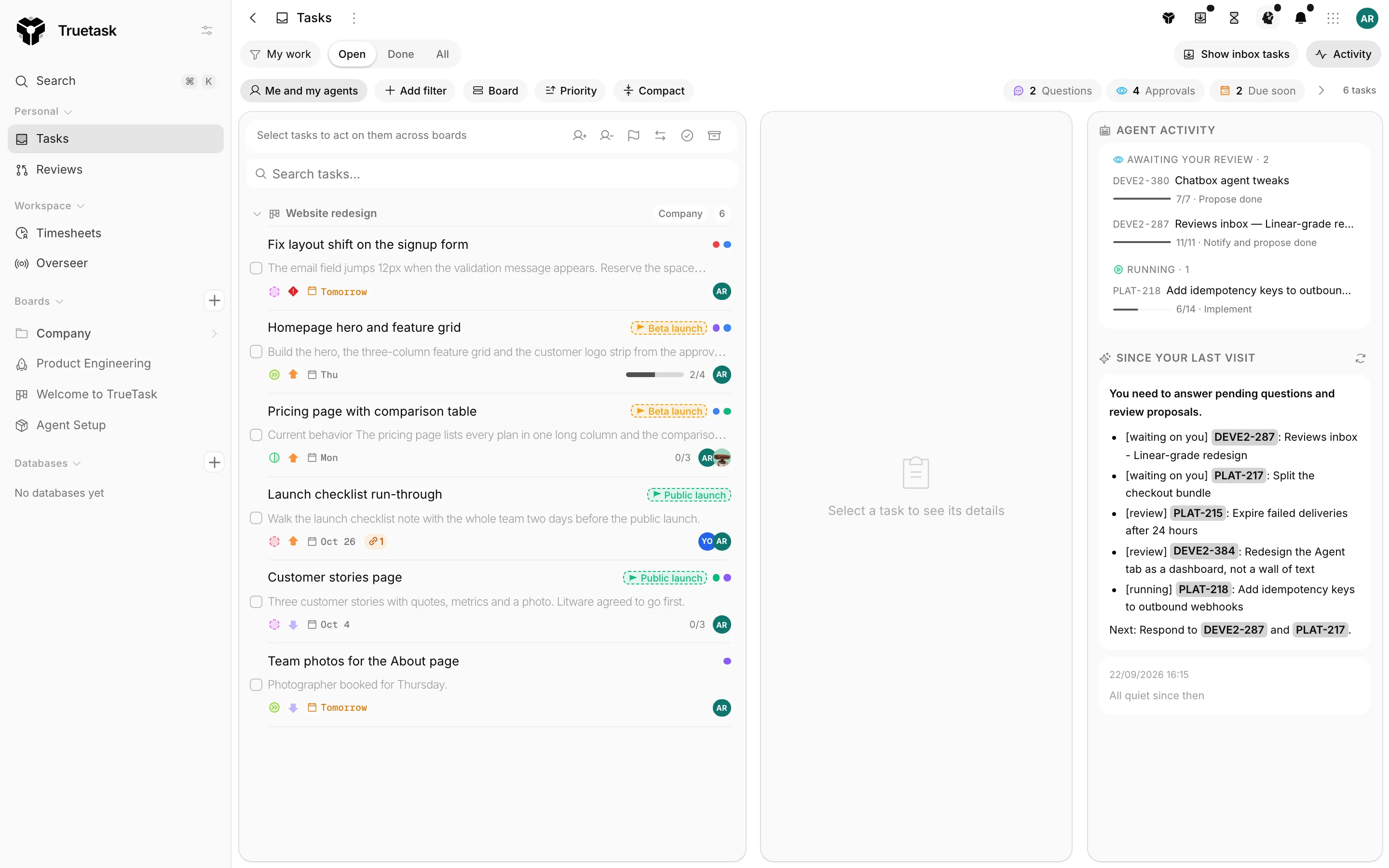
The attention strip
A band above the list that answers "what needs me right now". A tile only appears when its count is above zero, and the whole strip collapses to one quiet line when nothing does.
| Tile | Shows |
|---|---|
| Questions | Agent questions waiting on your answer. |
| Approvals | Agents proposing a task is done. |
| Failed runs | Agent runs that failed. |
| Pipelines need a human | Pipelines stalled on a decision. |
| Ready to read | Deliverables an agent finished writing. |
| Overdue | Your tasks past their due date. |
| Due soon | Your tasks due within 48 hours. |
| Stalled | Your open tasks sitting in an in-progress list untouched for five days. |
The last three are filters: clicking one narrows the list in place, so the count always equals what the click reveals. The rest open a popover of rows, and a row opens the task right here in the page rather than navigating to its board.
When nothing needs you the strip says so.
The activity rail
Toggle it with Activity in the toolbar. It holds your delegated agent runs grouped into lanes (Needs your input, Awaiting your review, Failed, Handing off, Running), then a Since your last visit digest: what was completed, created and commented on your boards since you were last here.
Above the digest, when AI is available, sits a short written brief of the same state. Refresh the brief rewrites it. A workspace without usable AI just shows the digest, which is the brief's ground truth anyway. See Truetask AI.
Choosing what you see
Three controls, left to right.
Status is a segmented control: Open, Done, All. Open excludes cancelled tasks as well as completed ones.
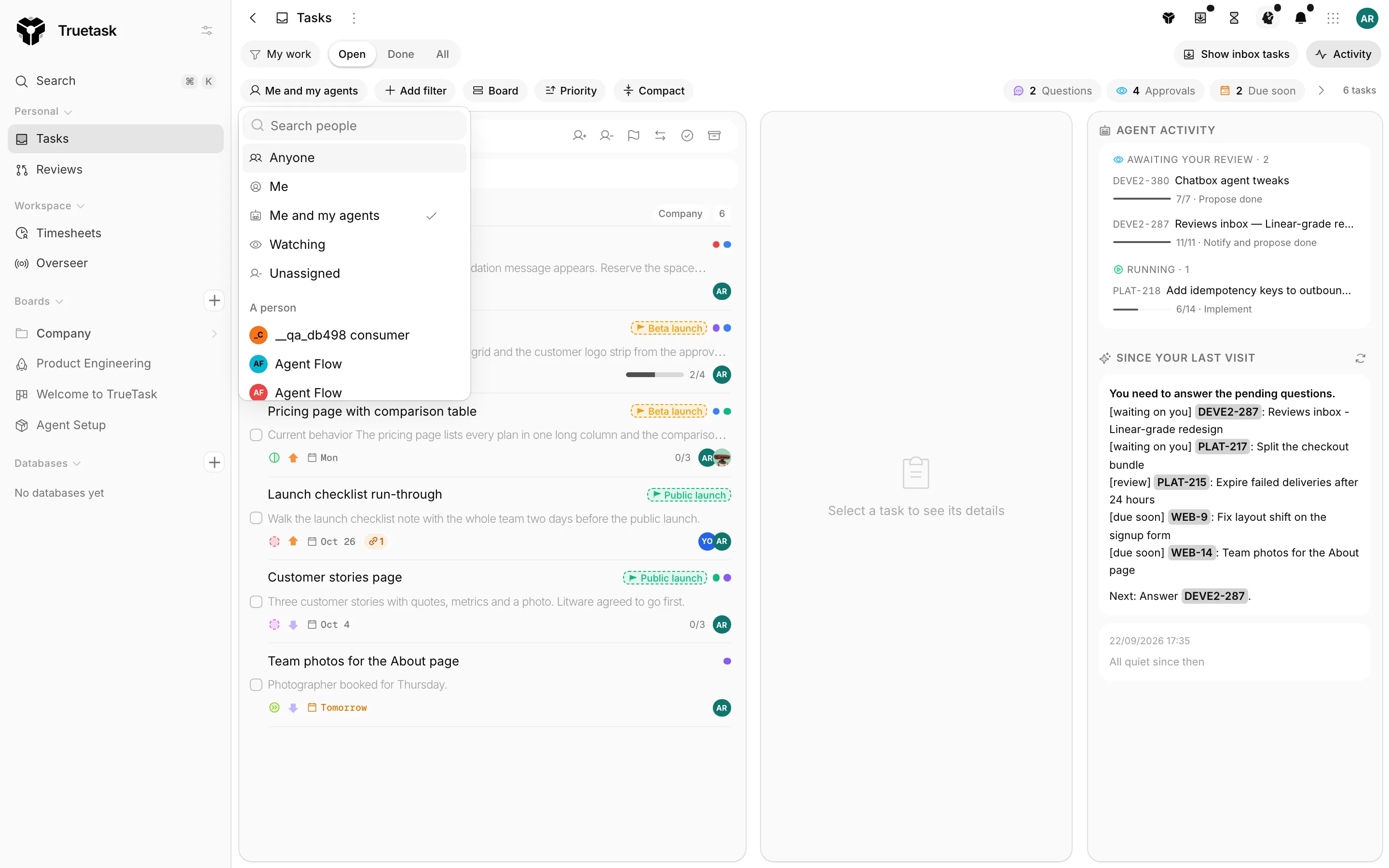
Who scopes the list by assignment:
| Scope | Keeps |
|---|---|
| Anyone | Every task you can see. |
| Me | Assigned to you. |
| Me and my agents | Yours plus your agents'. |
| Unassigned | Nobody on them. |
| Watching | Tasks you watch but are not assigned to. |
| A person | One named person. |
| A team | Anyone on a team. |
Add filter stacks the rest: Board, State, Priority, Tags, Milestone, Due, Blocked, Blocks others, Stalled and Project fields (the board fields of the boards in range).
Due takes a window: Overdue, Today, Due soon, Within 7 days, No due date, Has a due date.
Then Group (Board, State, Assignee, Priority, Due date, Milestone, None), Sort (Priority, Due date, Last updated, Title A-Z) and Compact for a denser row. The search box next to them narrows what is loaded by title or by task key, so typing SALE-5 jumps straight to that task.
Inbox tasks stay off this page unless you turn on Show inbox tasks. See Inbox.
The count chip on the right says how many matched. Tasks load 300 at a time, most recently updated first, so a very large view says "First N of M tasks" until you scroll for more.
Work views
Once the controls say what you want, save it.
Save as view names it and keeps the scope, filters, grouping, sort, density and which groups are collapsed. Changing anything afterwards puts Save changes in the toolbar, and the view picker marks it Changed since this view was saved.
The picker groups views into Built-in, My views and Shared with me. Seven built-ins ship in the product and cannot be edited:
| View | Is |
|---|---|
| My work | Your work, plus your agents'. Home. |
| Watching | What you watch. |
| Unassigned | Work with nobody on it. |
| In review | Tasks in a review-state list. |
| Blocked | Tasks with an unresolved blocker. |
| Overdue | Past due, grouped by due date. |
| Due this week | Due within seven days, grouped by due date. |
On a view you own, the row menu offers:
| Action | What it does |
|---|---|
| Rename | |
| Share with everyone | Every workspace member sees it under Shared with me. Stop sharing undoes it. |
| Pin to sidebar | The view appears as a child row under Tasks. |
| Open Views here by default | Tasks opens on this view instead of My work. |
| Delete view |
The default and the pins are yours, not the view's, so you can default to a view someone else shared with you.
Opening a task here
Clicking a row opens the task in a panel inside the page. It never navigates to the board, which is the point: you triage without losing the list. The panel's Open in board button is the way over when you do want to go.
Tasks the view does not list, for example one reached from a link, open in the same panel as an external task.
Links
The page keeps its state in the URL, so a view is shareable as a link:
| Parameter | Means |
|---|---|
?view=<id> | Open this view. |
?card=<id> | Select this task. |
&tab=<tab> | Land the panel on a tab. |
?q=<text> | Prefill the search box. |
The old /views address redirects here, query string and all.
The week frame
Timelogs in the App menu (Alt+T) opens a week grid over whatever page you are on, where you drag time onto tasks. It is not part of the Tasks page, but it is the surface most often used beside it. See Time tracking.