

Appearance
Calendar
The Calendar view plots the board's dated tasks on a grid. This page covers the three zoom levels, creating and moving tasks, and the milestone strip.
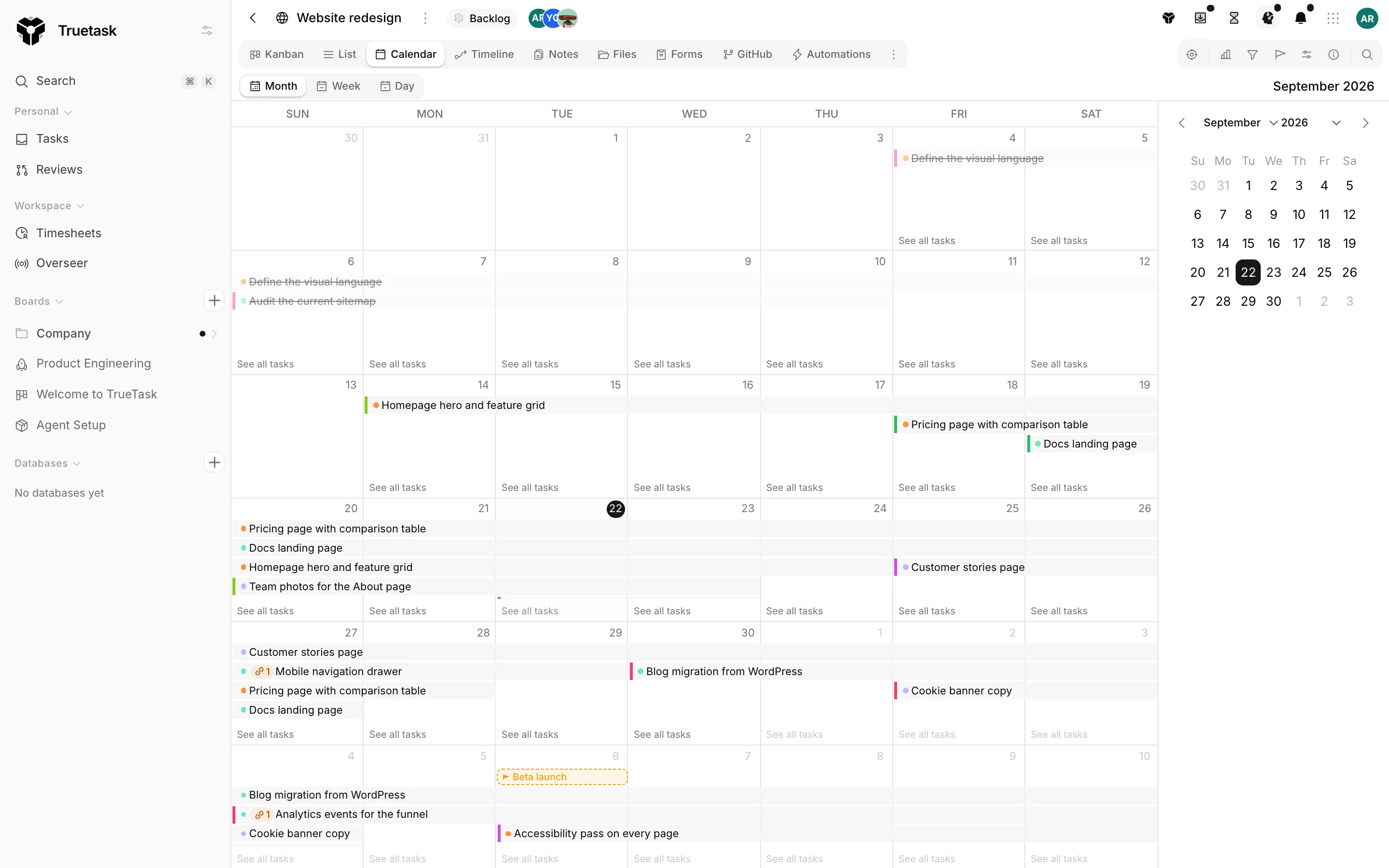
Month, week and day
Three tabs at the top of the view switch between Month, Week and Day. The arrows step back and forward, and Today in the board tools tray or in the views menu jumps back to the current date.
Only tasks with a start date, a due date, or both appear. A task with both is drawn as a bar across its span; a task with one date sits on that day. Overdue tasks (past their due date and not completed) are tinted red. A board with no dated tasks shows No dated tasks.
Hovering a task shows its list, its dates, its priority, its assignees and its checklist progress. When a day holds more tasks than fit, See all tasks opens a searchable popover with the rest.
Creating a task
Click an empty spot on a day to open the composer. Type a title and press Enter. The composer also carries List, Date and Assign so you can place the task without opening it afterwards.
In Month view you can also press and drag across several days: the composer opens with that whole range as the task's start and due dates.
Moving and resizing
Drag a task to another day. A task with both dates keeps its duration: the start lands on the day you dropped it and the due date follows. A task with one date just moves that date.
Drag either end of a multi-day bar to change its start or its due date without moving the other.
Viewers cannot drag or create anything.
Milestones
Dated milestones appear as a strip above the days they fall on. Drag a milestone pill to move its date. Right-click a pill for Edit milestone and Delete milestone, and right-click an empty day for Add milestone here.
See Milestones.
Keyboard
With the focus on the grid (and not in a field):
| Key | What it does |
|---|---|
| Left / Right | Move the focus a day at a time. |
| Up / Down | Move the focus a week at a time, in Month view. |
| Enter | Open the first task on the focused day, or start a new task there when the day is empty. |
| Escape | Cancel the composer, or drop the focus. |
Arrow keys are not wired up in Day view.
Filters
The Calendar respects the board's filters and its quick search, so narrowing the board narrows the grid. See Filters and search.
Related
- Timeline for the same dates as bars on a time axis
- Milestones for the dates the strip draws
- Filters and search for narrowing what is plotted
- Views for switching this view on or off