

Appearance
Milestones
Milestones mark the dates that matter. They show in their own panel, on the Calendar, on the Timeline and, if you want, on the task face.
The milestones panel
Open the page menu and choose Milestones, or use the flag button in the board tools tray. The panel floats over the board: drag its title bar to move it, double-click the bar to maximize it.
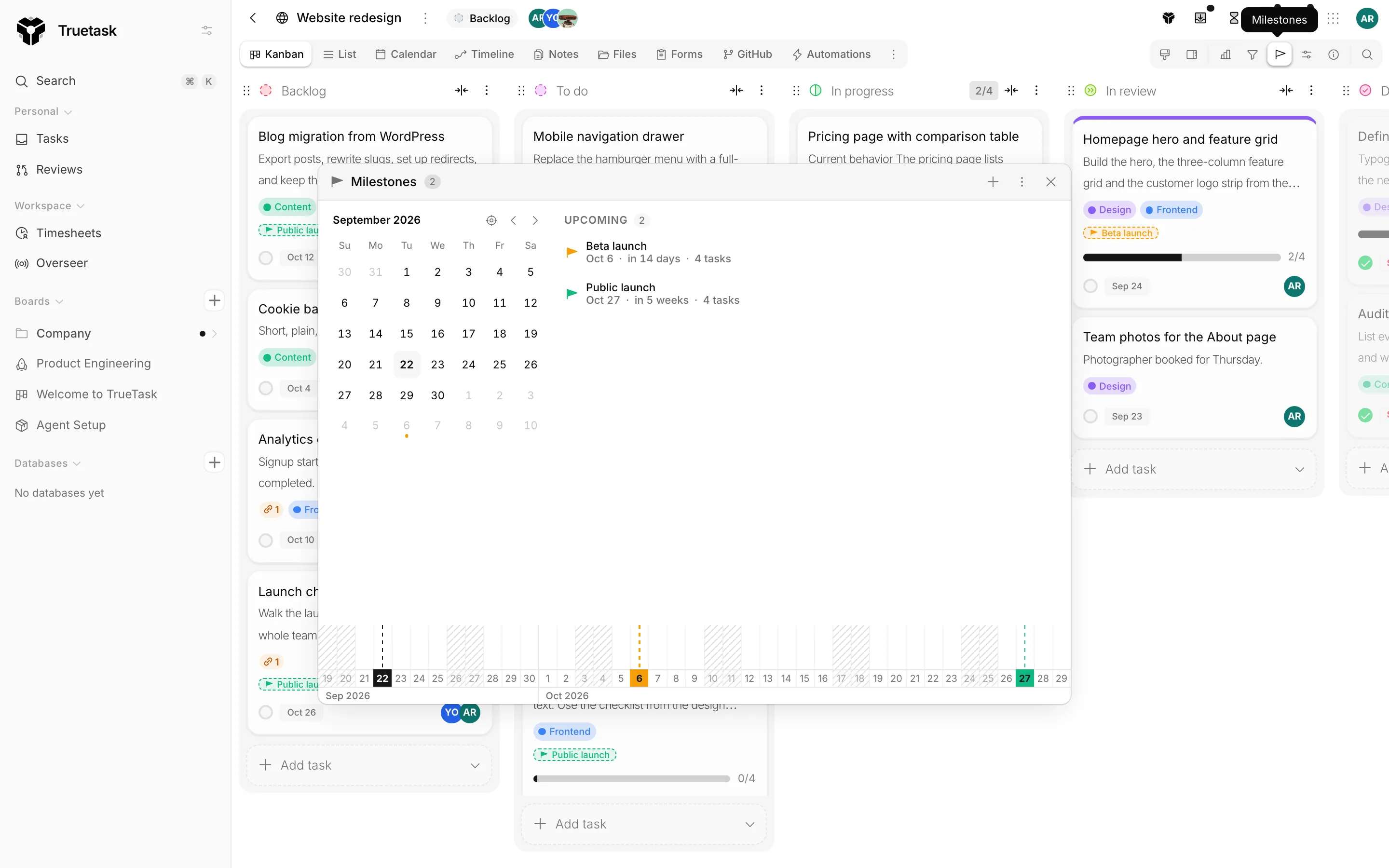
A month calendar sits on the left and the milestone list on the right. Click a day in the calendar to bring that day's milestone into view in the list; hovering either one highlights the other.
The list is grouped into Upcoming, Past and No date. Each row shows the milestone's colour, its name, how far away it is ("in 3 weeks", "12 days ago") and how many tasks are working toward it.
Board viewers can read the panel, and the button only appears for them once the board has a milestone. Editors and admins can add, edit and delete.
Create a milestone
Use the + in the panel title bar, or click a day in the panel's calendar. On the Calendar view, right-click an empty day and choose Add milestone here.
| Field | Notes |
|---|---|
| Colour | Picked from the swatch at the start of the name field. Optional. |
| Name | Required. |
| Date | Required. One date, not a range. |
| Notes | Optional. |
Press Enter to save, Escape to cancel. Creating, editing and deleting milestones through the API needs board admin.
Assign a task to a milestone
Open a task and use the Milestone section on the Details tab. It lists the board's milestones, or says No milestones on this board yet.
On the List view, Milestone is a column you can show, edit in place, group by and sort by. See List.
The milestone task counts in the panel come from the tasks assigned this way.
Where milestones appear
| Surface | How they show |
|---|---|
| Calendar | A strip of pills above the days they fall on. Drag a pill to move its date; right-click it to edit or delete. |
| Timeline | Dated markers across the chart, so a plan reads against them. The Milestones date range zooms the axis to span them all. |
| Kanban | A marker on the task face, when Milestone is switched on under Kanban style. |
A milestone can be hidden through the API or MCP. A hidden one is skipped on the Calendar and the Timeline, and the panel marks it Hidden. There is no toggle for this in the app: every milestone you create is visible.
Automations
Two triggers key off milestones.
| Trigger | When it runs |
|---|---|
| Milestone Approaching | A set number of days before a milestone's date. You choose the offset, for example 7 for a week's notice. |
| Milestone Reached | When a milestone's date arrives. |
Both fire once per milestone and carry no task context, so the nodes after them work on the board: send an email, make an HTTP request, or create a task. To act on the tasks in a milestone, add a Target Card or a For Each step first.
Placeholders for the milestone id, name and date are available to the nodes downstream. The Automate milestones item in the panel menu opens the builder with the milestone triggers in hand.
See Triggers and Placeholders.