

Appearance
Actions and logic
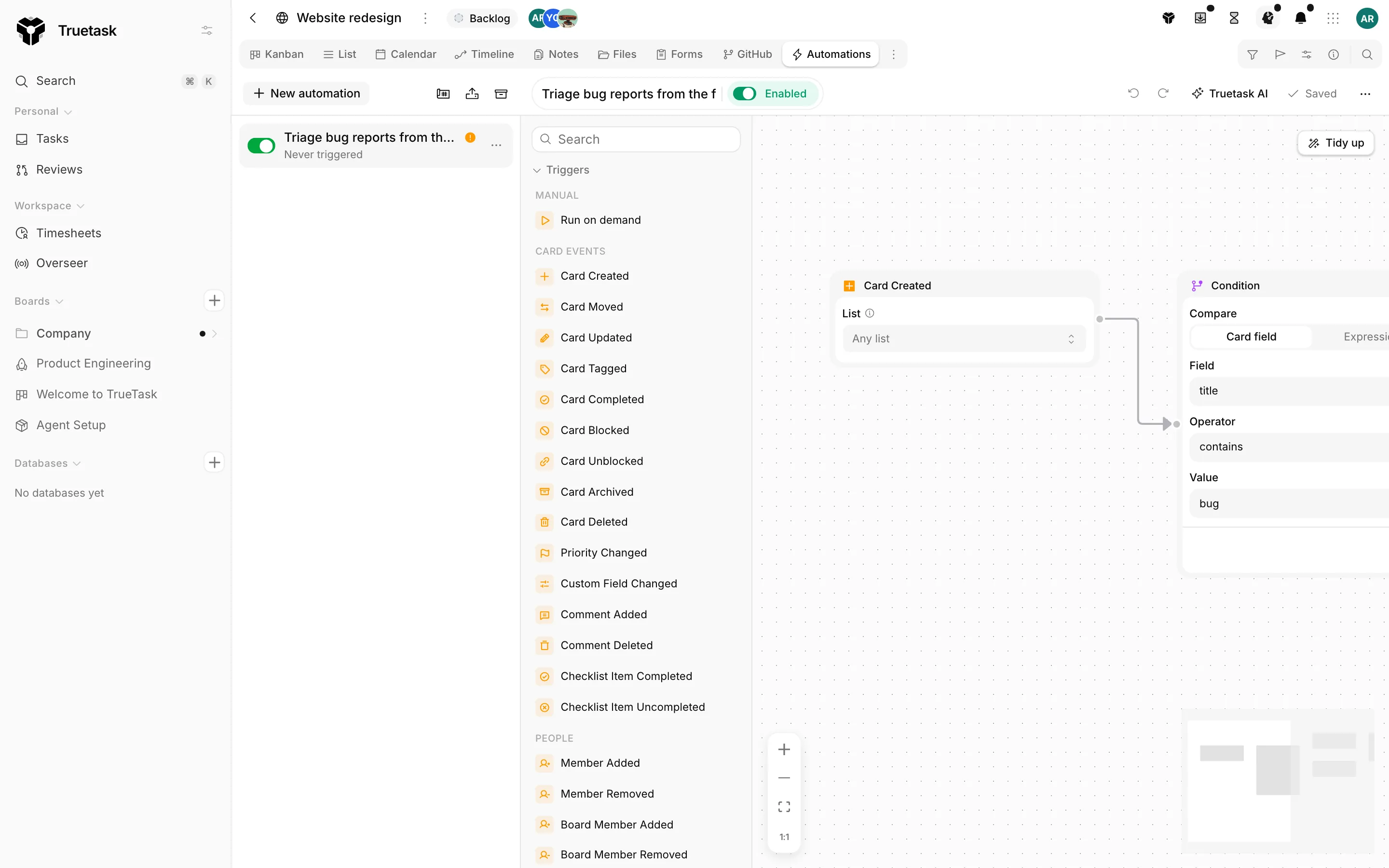
After the trigger come the nodes that do the work. Actions change something: a task, a board, a note, a message, an outside service. Logic nodes steer the run: branch, stop, repeat, wait or parse.
Most action nodes work on the run's focus task: the task the trigger carried. A Target Card, Target Linked Record or Target Board node moves that focus, and everything after it acts on the new target.
Card lifecycle
| Node | What it does | Options |
|---|---|---|
| Create Card | Creates a new task, on this board or another one, with placeholders filled from the trigger. | Start from (Blank task or a task template), Title, Create on board, List, Description, Field values, Linked records, Link the triggering note, Attach received files |
| Duplicate Card | Copies the current task on the same board. | Target list (Same as source, First open list, or a list), Copy checklists, Copy dates, Copy tags, Copy custom fields, Copy attachments |
| Move Card | Moves the task to another list on this board, by name or by flow state. | List |
| Move to Board | Moves the task to another board and list. | Target board, Target list |
| Complete Card | Marks the task complete, or reopens it. | When completed or When uncompleted |
| Archive Card | Archives the task: off the board, but kept. | None |
| Delete Card | Deletes the task. It goes to the trash, where it can be restored. | None |
Move to Board clears tags, members and priority, because those belong to the old board. A duplicate always resets its checklist items to unticked.
Card content
| Node | What it does | Options |
|---|---|---|
| Set Title | Replaces the task's title. Placeholders and the last AI output are allowed. | Title |
| Set Description | Replaces the task's description, in Markdown. Left empty, it takes the last AI output. | Description, Clear the description |
| Set Dates | Sets the task's start and due dates, as fixed dates or relative to today. | Target (End date, Start date, Both), Mode (Offset from now, Specific date, Clear), then the offsets or dates |
| Set Priority | Sets the task's priority by name. | Priority |
| Set Custom Field | Sets a custom field's value on the task, typed per field. | Custom field, Value, Clear the field |
| Link Record | Links records through a relation field. | Relation field, Mode (Add, Replace, Remove, Clear), Records (one title or id per line), Create the record when missing, Match by field |
Relations are always set with Link Record, never with Set Custom Field. Link Record matches targets by title by default, and Match by field lets you match on something else, such as Email. See Custom fields.
Board
| Node | What it does | Options |
|---|---|---|
| Set Board Status | Sets the board's status in the board details. | Board status |
| Set Board Summary | Sets or clears the board's one-line summary. Left empty, it takes the last AI output. | Summary, Clear the summary |
| Set Board Dates | Sets the board's start and end dates. | Same Target, Mode and value fields as Set Dates |
| Set Board Field | Sets the value of a board-level custom field. | Board field, Value |
| Set Board Visibility | Shows or hides the board on the Overseer portfolio. | Overseer visibility (Show on Overseer, Hide from Overseer) |
See Overseer.
Tags
| Node | What it does | Options |
|---|---|---|
| Add Tag | Adds one tag. The tag must already exist on the board. | Tag name |
| Remove Tag | Removes the given tags, or every tag. | Tags to remove, Remove all tags |
| Apply Tags | Applies a list of tags in one go, usually from an AI Suggest Tags step. | Tags in Pick tags or Dynamic mode, Create them |
Apply Tags in Dynamic mode reads its list from a placeholder such as {ai.output}. It understands EXISTING:foo,bar (add those board tags), NEW:baz (create it, then add it), a plain comma list (existing tags only) and NONE (do nothing). See Tags.
People
| Node | What it does | Options |
|---|---|---|
| Assign Member | Assigns a board member, by name or the person who triggered the run. | Member, or Triggering user |
| Unassign Member | Removes one assignee, or everyone. | Member, or Any member |
Agents
| Node | What it does | Options |
|---|---|---|
| Kick off Agent | Starts an agent on the task through whatever power it has: its own runner, the owner's desktop, or workspace AI. | Agent, Agent workflow (or Board default) |
The run waits in a queue until something can pick it up, one task at a time per agent. This is not the same as the Agent node, which runs an AI turn inside the automation: see AI nodes and Delegating work to agents.
Communication
| Node | What it does | Options |
|---|---|---|
| Add Comment | Posts a comment, with placeholders filled in. | Message |
| Send Email | Sends an email to any address. | To, Cc, Bcc, Reply to, Subject, Body, Format as Markdown, Attachments |
| Send text | Sends a text message through the workspace's Twilio number. | To, Message, From |
| Send WhatsApp | Sends a WhatsApp message through the workspace's number. | To, Message |
Send Email needs outgoing mail configured.
Self-hosted only
Configure the mail server under Settings > Server > SMTP; see SMTP.
Send text and Send WhatsApp only appear once that service is connected, and both take a phone number in international format or a placeholder for a phone field on the task. WhatsApp only delivers free-form text within 24 hours of the customer's last message; outside that window an approved template is required. See Messaging integrations.
Notes
| Node | What it does | Options |
|---|---|---|
| Read Note | Reads one note, a folder, or every note of the board into placeholders for the steps after it. | Read (All notes, All notes in folder, Specific note), then the folder or note |
| Write Note | Creates a note with a title and content, optionally linked to the task. | Note name, Parent, Content, Link the card |
| Update Note | Appends to, or replaces, the content of an existing note. | Which note (Triggering note, Card's linked note, By name), Write mode (Append, Prepend, Replace), Content, Create if missing |
| Delete Note | Deletes a note. It goes to the trash, where it can be restored. | Which note |
A Read Note step exposes its result as {notes.<node_name>.content}, {notes.<node_name>.count} and friends; see Notes.
Integrations
| Node | What it does | Options |
|---|---|---|
| HTTP Request | Calls any URL with a method, headers and body. The response is available to the steps after it. | URL, Method, Headers, Body |
The response is addressable as {http.<node_name>.status}, {http.<node_name>.body} and {http.<node_name>.headers.<name>}.
Outbound calls are filtered
A URL pointing at a private address is refused unless the workspace opted in. Redirects are followed at most three times and the call times out after ten seconds.
Self-hosted only
The opt-in is Settings > General > Network; see Network policy.
Git
Every git action works on the pull request or issue linked to the focus task.
| Node | What it does | Options |
|---|---|---|
| Comment on PR | Comments on the pull request linked to the task. | Message |
| Merge PR | Merges the pull request linked to the task. | Merge method (Merge commit, Squash and merge, Rebase and merge), Commit title |
| Set PR state | Marks the linked pull request as draft or ready for review, or closes it. | Pull request state (Ready for review, Convert to draft, Close PR, Reopen PR) |
| Comment on issue | Comments on the issue linked to the task. | Message |
| Close / reopen issue | Closes or reopens the issue linked to the task. | Issue state (Close issue, Reopen issue) |
See Git integration.
Logic: flow control
| Node | What it does | Options |
|---|---|---|
| Condition | Branches on a check. True goes one way, false the other. | Compare (Card field or Expression), Field, Operator, Value |
| Filter | Stops the run unless the check passes; otherwise the branch simply ends here. | Same fields as Condition |
| For Each | Repeats the steps after it once per item. | Iterate over, the source, Max iterations |
| Delay | Waits for a set time before continuing; the run resumes on its own later. | Duration, Unit (Minutes, Hours, Days) |
Condition and Filter
In Card field mode the left side is a picker: Title, Description, Priority, Tags, Members, List, List state, Completed, the board's status, status kind and summary, plus every custom field, rollup and formula on the board. In Expression mode the left side is free text, so you can compare any placeholder, including two upstream outputs.
The operators offered depend on the field's type:
| Field type | Operators |
|---|---|
| Text and anything untyped | equals, not equals, contains, not contains, is empty, is not empty |
| Number, rollup, date | equals, not equals, greater than, less than, is empty, is not empty |
| Checkbox, status kind, list state | equals, not equals |
| Single select, priority, board status | equals, not equals, is empty, is not empty |
| Multi select, tags | contains, not contains, is empty, is not empty |
is empty and is not empty take no value. A Condition node has two outgoing handles, True and False; a Filter has one.
For Each
| Iterate over | What it walks |
|---|---|
| JSON array | An array from a placeholder, typically a parsed HTTP response |
| All cards on this board | Every non-archived task on the board |
| All cards in a list | The tasks of one list |
| Cards matching a filter | Tasks matching a filter on this board |
| Records linked through a field | Everything linked through a relation field on the focus task |
Inside the loop body, {loop.item} is the current item, {loop.index} the zero-based counter and {loop.total} the count. The card-iterating sources also swap the focus task, so the card-aware nodes work as usual. Iterations are capped at 5000, and the run's own step budget applies on top.
Edges out of For Each carry one of two handles: body is the loop, after is what runs once the loop is done.
A Delay parks the rest of the run and stores where to pick up. A scheduled sweep resumes it when the wait is over, so a long delay costs nothing in the meantime.
Logic: data
| Node | What it does | Options |
|---|---|---|
| Parse JSON | Extracts values from JSON text, typically an HTTP response, into placeholders. | Source, Extract values (a path and a variable name per row) |
| Parse XML | Extracts values from XML text into placeholders. | Source, Extract values |
Extracted values read as {parsed.<node_name>.<variable>}, and {parsed.<node_name>} is the whole result.
Logic: focus
| Node | What it does | Options |
|---|---|---|
| Target Card | Switches focus to another task. Every step after it acts on that task. | Target card: pick a task on this board |
| Target Linked Record | Switches focus to a record linked through a relation field, the first or the last one. | Relation field, Which record (First linked, Last linked) |
| Target Board | Switches focus to another board. Lists, tags and members in the steps after it come from that board. | Target board |
Target Board also changes what the config panels of downstream nodes offer: their list, tag, member and field pickers load from the targeted board.
Tools
| Node | What it does | Options |
|---|---|---|
| Debug | Snapshots the placeholders available at this point into the run log. Nothing else happens. | Pinned values: a label and an expression per row |
Debug costs nothing at runtime, and its snapshots show up in the builder's Last run panel. See Runs and logs.
Organization
| Node | What it does | Options |
|---|---|---|
| Group | Frames a set of nodes under a label and a tint. Purely visual, it never runs. | Label, Color |
| Sticky note | A note on the canvas for whoever opens this automation next. It never runs. | Content, Color |
What a database board hides
A database is a flat records table with no lists, no flow, no task frame extras, no board details, no notes, no git and no agent lane. So these nodes are not offered there at all: Complete Card, Move Card, Set Priority, Set Dates, Set Description, Add Comment, every Board action, every Notes action, every Git action, Kick off Agent, the Agent node, and every Quick AI action.
Everything else stays, including Create Record, Duplicate Record, Link Record, the tag and owner actions, Send Email, HTTP Request, and all of Logic, Tools and Organization. See Databases.
Plans
Truetask Cloud only
Every node type is available on every plan, including the Free plan. What a plan limits is how many automations can be active at once and how much AI a workspace may use. A node your workspace cannot use is shown locked with a crown and a tooltip that names the reason; today the only reason is AI. See Plans and billing.
The AI and Agent nodes need AI to be available for the workspace, and the Agent node also needs a model that can call tools; see AI nodes.