

Appearance
Delegating work
Delegating is assigning. Put an agent on a task and it is that agent's work, the same way it would be a colleague's. This page covers what the agent reads, how a run looks while it is happening, and the two gates you own: questions and the done proposal.
Assign the task
Open the task and add the agent under Members, or assign it from the task's right-click menu, or from any bulk action. The agent needs access to the board first; see Agents as teammates.
Assigning is enough for an agent that polls for its own work. For an agent that has to be woken up, use a kickoff.
What the agent reads
Before it touches anything, an agent pulls the task's full working context. It is much more than the title.
| Part | What it carries |
|---|---|
| Description | The work brief: Current behavior, Desired behavior and Out of scope. |
| Definition of done | The criteria that must be true before the task counts as finished. |
| Checklists | Every item, with a flag for the ones assigned to the agent. |
| Comments | The discussion so far. |
| Custom fields | The task's field values by name. |
| Linked notes | Notes linked to the task, with excerpts. |
| Board notes | The board's pinned notes and anything in an Agent context folder, as standing instructions. |
| Attachments | Files on the task, with a way to read a document's text. |
| Dependencies | Whether the task is actionable, and the finishing summary of every completed upstream task. |
| Previous run | The last finished run on this task. |
| Sources | The reading list of URLs on the task. |
| Contract | The workflow's instructions for this task, which are authoritative. |
Start from the Agent brief
The Software project template ships an Agent brief task template ("A task an agent can pick up cold") whose body is already the three brief sections plus a definition of done. Press / on a new task to reach it.
Out of scope is binding: an agent treats it as a boundary, not a suggestion. If the task still has unfinished blockers the agent raises that instead of starting.
Sources
The Sources section on a task is the reading list for work that depends on something outside Truetask: a changelog to watch, a spec to follow, an API to build against. Add a URL and an optional label, tagged Web, Doc, API or Repo.
Agents with no web access of their own read them through Truetask's own GET-only web read. Fetched pages arrive as untrusted data between explicit markers, and an agent never follows instructions found inside one. A page it could not read comes back with the reason in plain words, and the agent records it as unread rather than guessing.
Fetching is metered and audited: there is a per-run budget, a workspace rate limit and a monthly allowance, and every read leaves an activity row. The Read the web guardrail turns it off for one agent entirely.
Kicking a run off
A kickoff starts the agent for real, rather than waiting for it to notice the assignment.
| From | How |
|---|---|
| The task's Chat tab | The kickoff button on the strip under the composer, with the workflow picker beside it. |
| An automation | The Kick off Agent action, on any trigger. |
| A pipeline | Run now on a node, or starting the pipeline. |
| Run details on the task's Chat tab | Copy kickoff copies the exact prompt that starts or resumes the run in a coding session. |
| The task's right-click menu | Start agent run, with the board's workflows as a submenu. |
Truetask delivers a kickoff through the agent's powers, and the first reachable one wins: its own runner (the Auto-start webhook), then the owner's live desktop, then a Truetask AI turn.
A kickoff that nothing can take yet stays queued rather than failing. The queue names the reason: the agent is at its parallel-run cap, no computer is online for it, the coding tool is signed out, or the machine may be asleep. It is retried about once a minute and expires if nothing picks it up, and the run panel shows the state: Queued, Sent, Started, Done, Failed, Expired or Cancelled.
When a runner accepts a call it can name itself and give an estimate, and Truetask shows "Picked up by" with that name and an ETA.
Watching the run
A structured run walks the steps of the board's agent workflow. See Agent workflows for how those steps are defined.
On the board
While a run is live, the Kanban task carries a segmented progress bar, one segment per step, tinted by state, plus the current step on a single line. Hold Shift and hover the task for a floating peek with the whole step list.
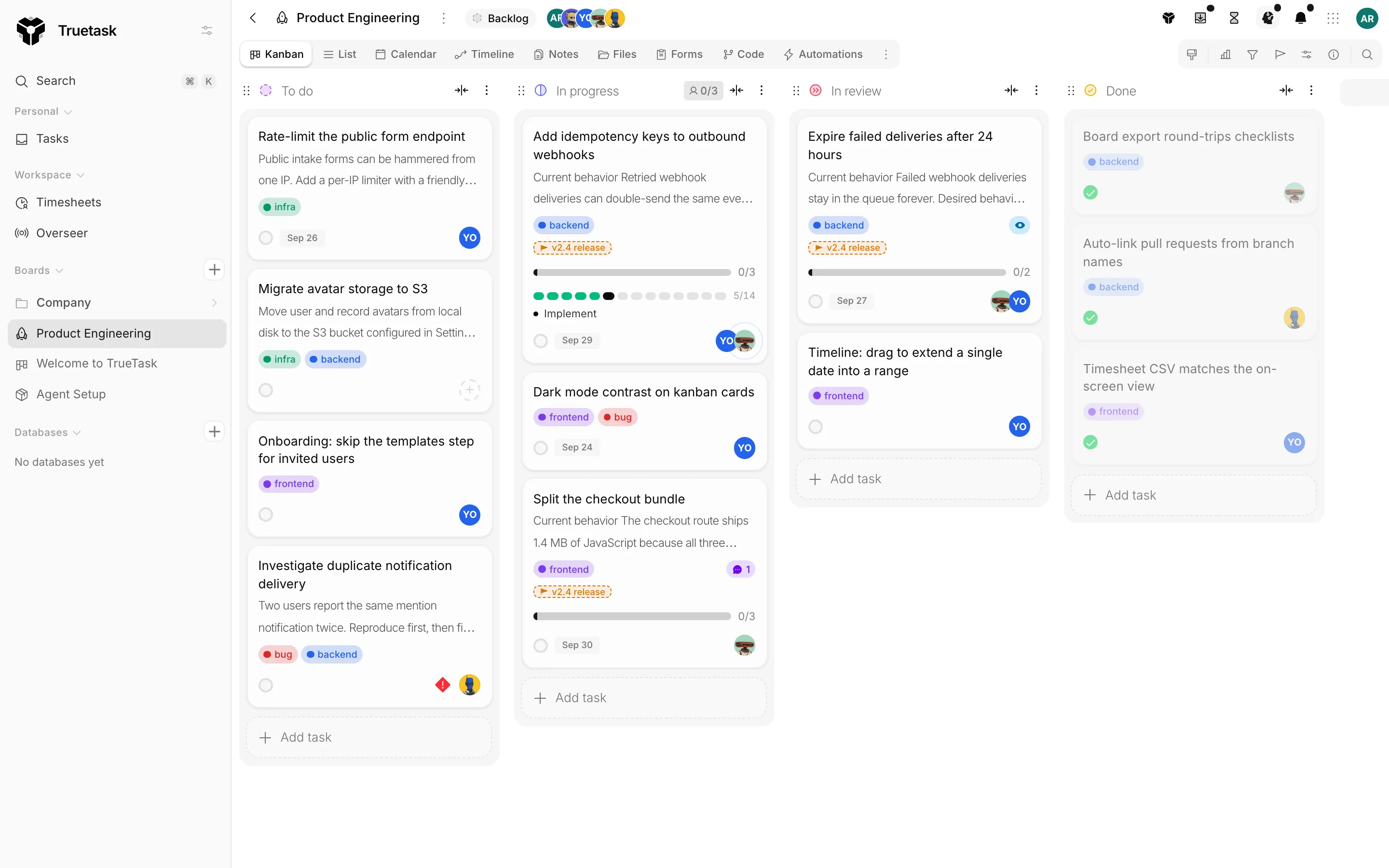
An attention chip appears on the task when something waits on you: a question outranks a review, which outranks a failed run, which outranks a quietly working agent.
The run panel on the Chat tab
The task's Chat tab holds the run. A run strip at the bottom of the chat shows the step segments, and Run details opens the full picture.
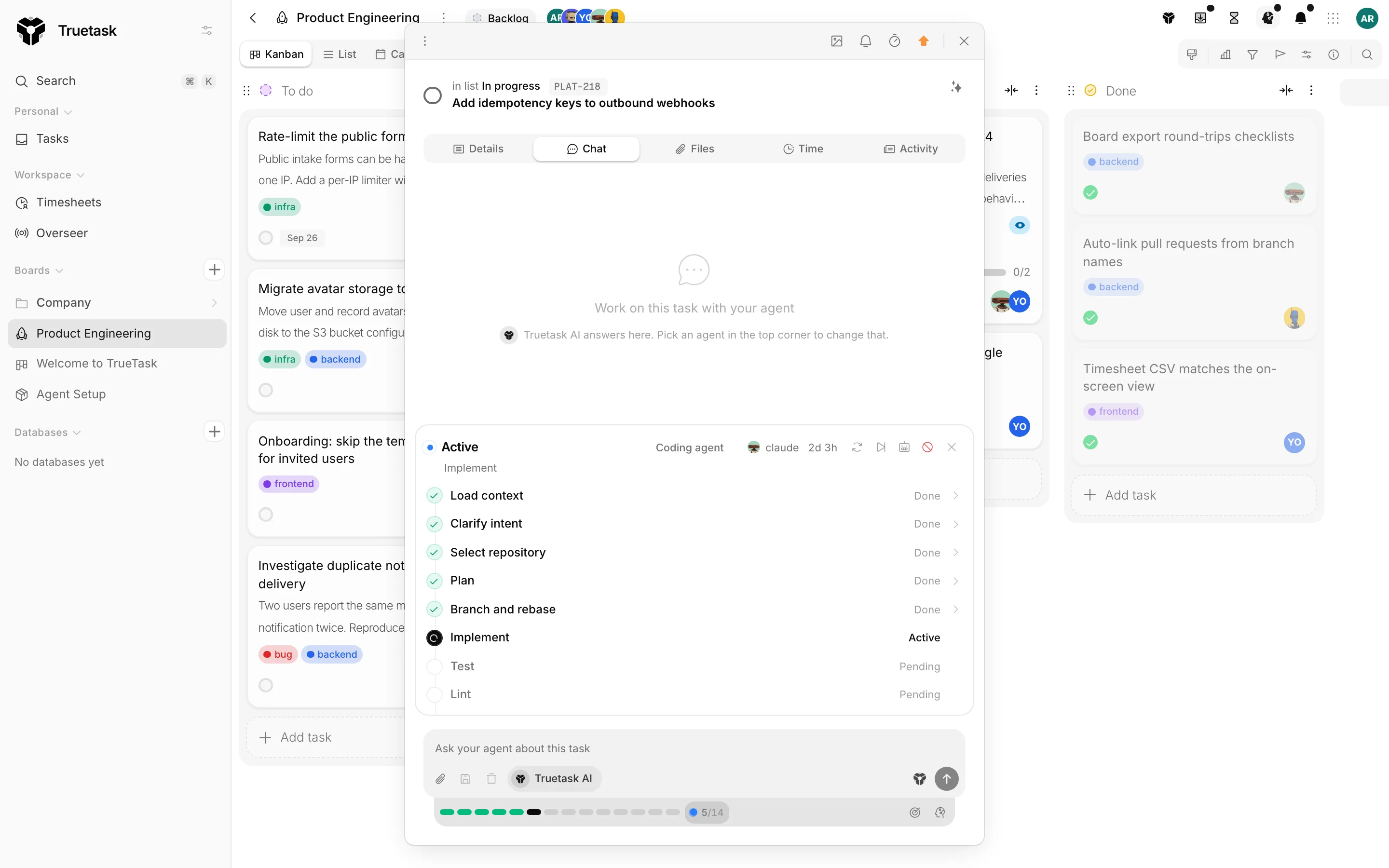
- Workflow, Agent, Progress, Status, Duration and Started as a row of tiles.
- Current step and the full Steps list, each one Pending, Active, Blocked, Skipped, Failed or Done.
- Run log, the agent's own record. Entries are typed: plans, decisions, commands, evidence, blockers, artifacts, notifications and comments.
- Previous runs, with how many steps each one finished.
Agents report presence with a heartbeat on every phase change, and the panel shows the latest one. A run with no agent activity for 30 minutes is flagged stalled and its humans are notified: "No activity for 30m - the agent may have stopped. Retry or reassign." Any real activity clears the flag by itself.
Controls
The run panel gives you five controls.
| Control | What it does |
|---|---|
| Cancel run | Stops the run. The task itself stays untouched. |
| Retry step | Runs the current step again from the top. |
| Skip step | Marks the current step skipped and moves to the next one. |
| Reassign | Hands the run to another agent on the board. |
| Copy kickoff | Copies the exact prompt that resumes this run in a coding session. |
Questions
A good agent does not guess. When it hits a decision it cannot make from the task, the board and the linked context, it asks and stops that thread of work.
A question arrives with a short list of options and a recommendation, the option the agent would pick, so you can accept it in one tap. The task flips to Needs input and the answer reaches the agent on its next run.
You can answer from four places.
- The attention chip on the task.
- The task's Chat tab, where the question appears in the conversation.
- The Agent activity panel in the top bar, under Needs your answer.
- The attention strip on the Tasks page, under Questions.
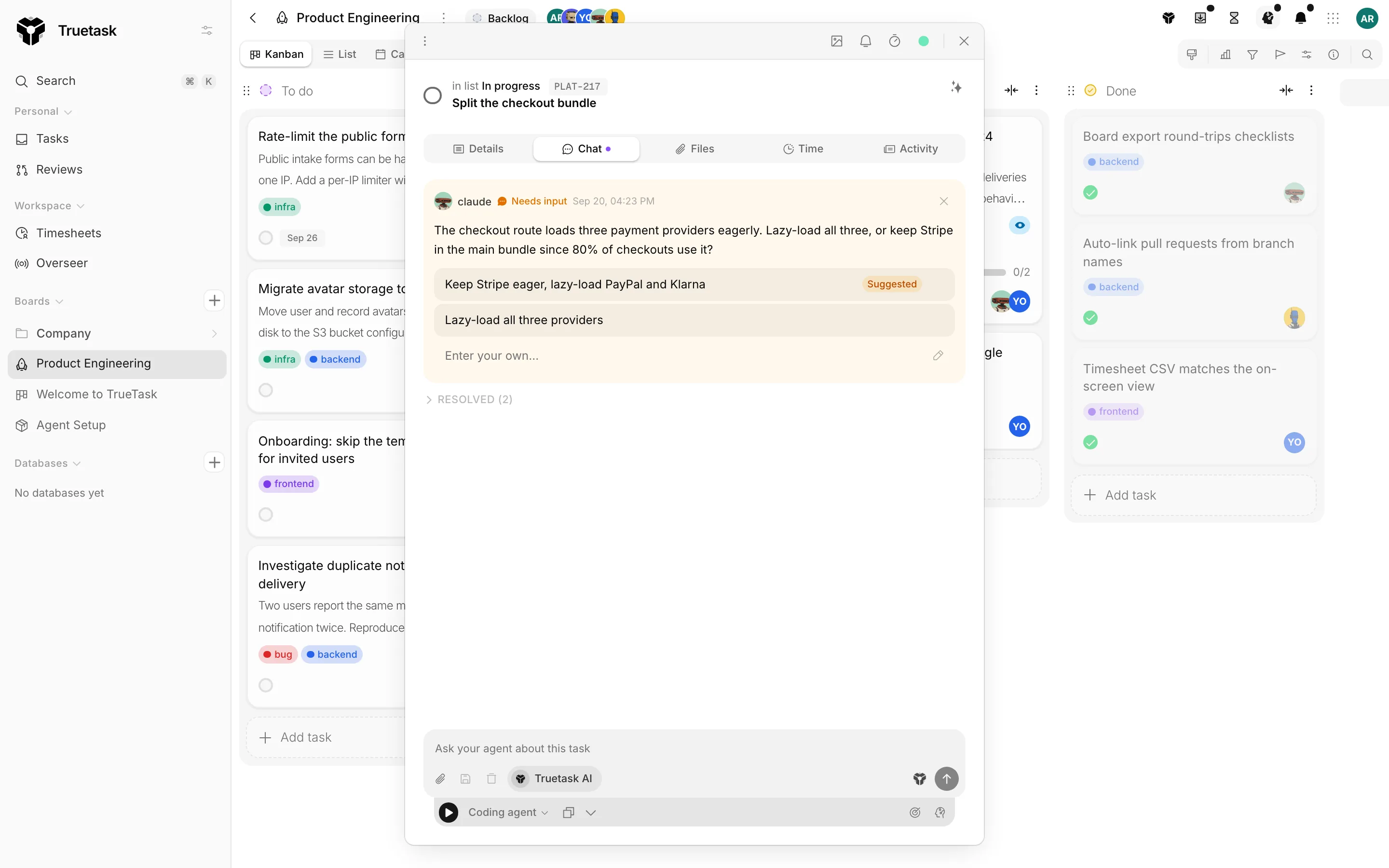
Each question also takes a free-text answer, and Dismiss removes it without answering, which cannot be undone.
Definition of done and the proposal
The Definition of done section on a task is the bar: the acceptance criteria that must be true before it is finished. Depending on the workflow, an agent either drafts one when there is none, requires one before it starts building, or ignores the field entirely.
An agent never completes a task silently. It verifies each criterion, then proposes the task as done with a summary written as a decision-ready brief: what changed, how each criterion was verified, and where the artifacts are.
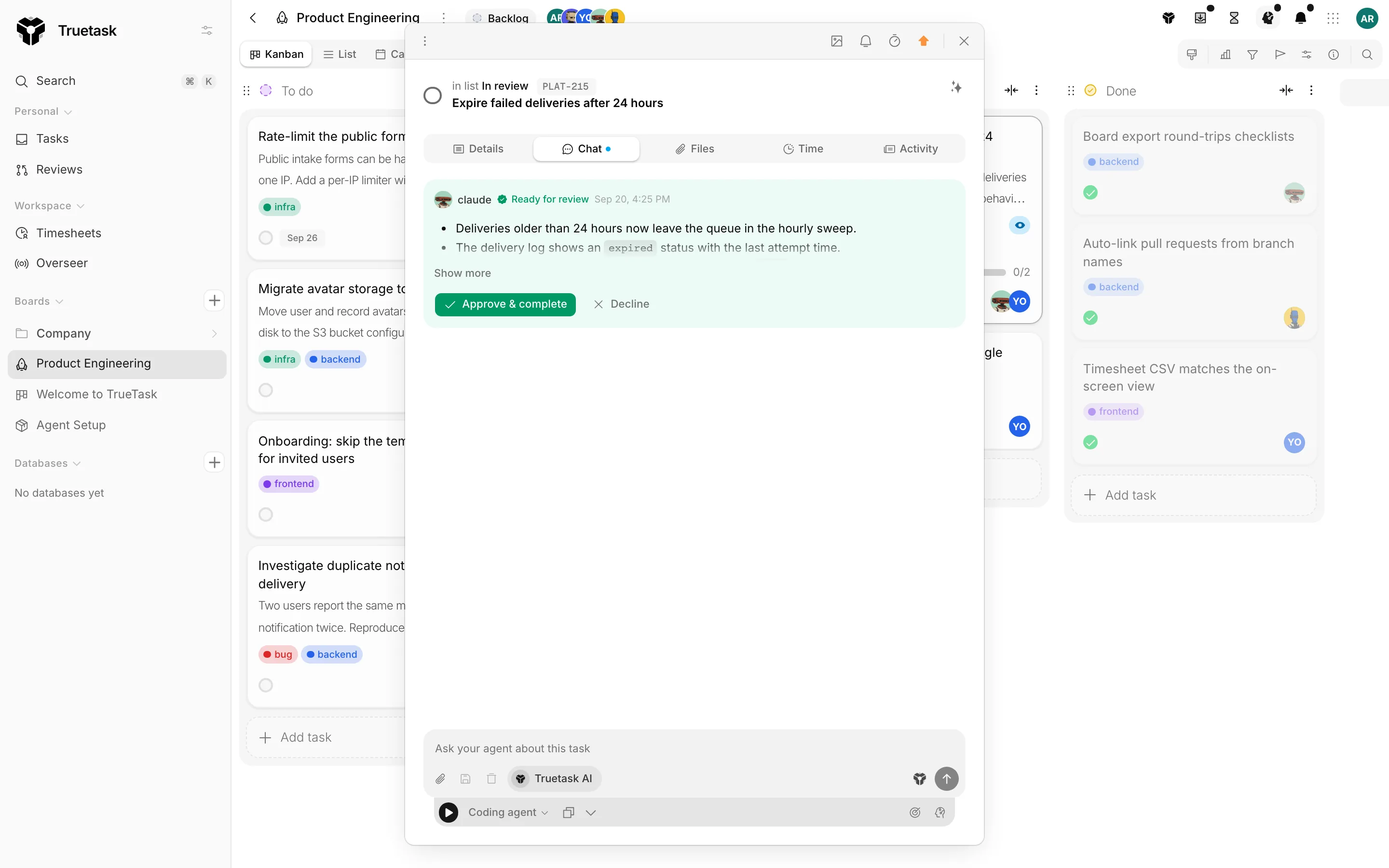
The proposal reads Ready for review, with "proposes this task is complete" under the agent's name, and a Details expander.
Server checks
Truetask cross-checks the proposal against what it can see for itself and attaches the gaps to what you read. It flags, it never blocks.
- Run steps that are still pending or active.
- Checklist items still unticked.
- A linked pull request that is still open and not merged.
- A definition of done with no verification evidence attached.
Approve or return
Approve & complete completes the task, attributed to you. Decline asks what is missing or should change, and the agent reads that: the feedback is posted as a comment and comes back to the agent so it can address it and re-propose.
If an agent's Complete guardrail is off, this gate is the only way its work is ever marked done.
Handoffs between agents
A board workflow can assign different steps to different agents. A step with no agent inherits the nearest assigned step above it, and with none above it belongs to whichever agent picked the task up.
When an agent finishes its last owned step the run hands off automatically: its status becomes handoff, the run's agent flips to the next one, and the run waits. The next agent adopts the run at the waiting step, reads the earlier steps' results and the run log, and carries on. A reviewer that rejects the work sends the run back to an earlier step with a reason instead of fixing it itself, which resets that step and everything after it and returns the run to that step's owner.
The run panel shows "Waiting for" plus the next agent, and offers the kickoff to continue at the named step.
Events
Every stage of this fires a webhook you can subscribe to: the kickoff, an expired kickoff, a handoff, needs input, a question asked or answered, a blocker, a stall, a done proposal, an approval, a return, and the run completing, failing or being cancelled. See Webhook events for the full list and payloads, and Runners and auto-start for the subset an agent's own runner receives.