

Appearance
Models and providers
Everything AI in Truetask runs on models a workspace owner or admin has connected. There is no hidden default: if nothing is configured, the AI surfaces say so and stay out of the way.
Open Settings > Integrations > AI.
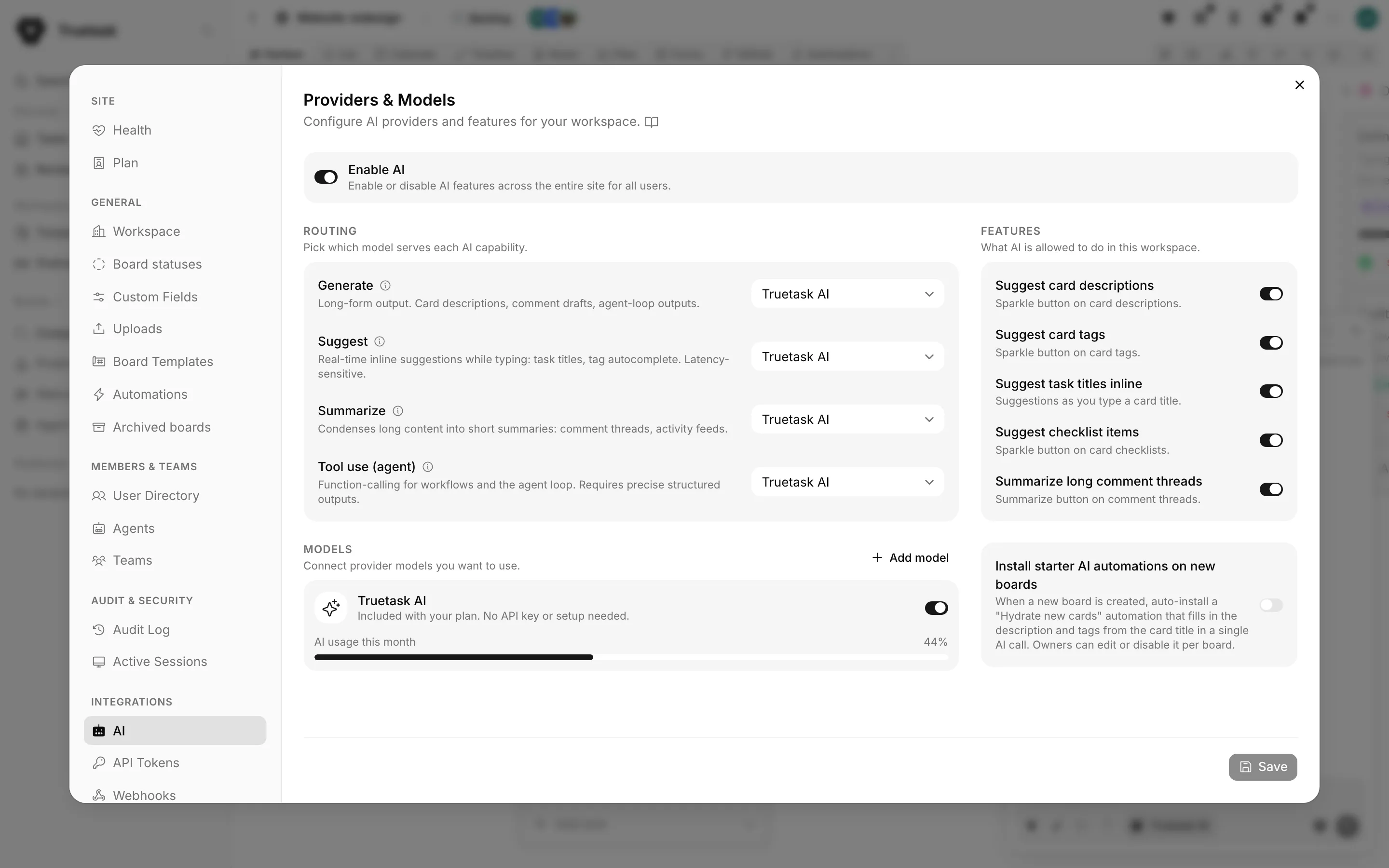
Enable AI
The switch at the top is Enable AI: "Enable or disable AI features across the entire site for all users."
With it off, the pane says "AI is currently disabled. All AI-powered features are turned off for every user in this workspace." That is the kill switch, and it covers agents, automations, assists and the assistant.
Models
Models is the list of provider models this workspace can use: "Connect provider models you want to use." Add model opens the form.
| Field | What it is |
|---|---|
| Provider | Who serves the model. |
| Model ID | The provider's own id, for example gpt-4o. |
| Name | What the model is called in Truetask. Derived from the provider for known providers, editable for Custom. |
| API URL | Filled in from the provider's default, and shown for local and custom providers. |
| API Key | The credential. Stored server-side and never sent to the browser. |
| Enabled | Whether the model is available for routing. |
Test checks the connection and tells you which way it failed: the endpoint was unreachable, it was reachable but authentication failed, or it worked. Fetch available models pulls the provider's model list so you can pick instead of typing an id.
Providers
| Provider | Default API URL | Needs |
|---|---|---|
| OpenAI | https://api.openai.com/v1 | An API key. |
| Anthropic | https://api.anthropic.com/v1 | An API key. |
| Gemini | https://generativelanguage.googleapis.com/v1beta | An API key. |
| OpenRouter | https://openrouter.ai/api/v1 | An API key. |
| Ollama | http://localhost:11434 | A reachable endpoint; a key is usually not required. |
| LM Studio | http://localhost:1234 | A reachable endpoint; a key is usually not required. |
| oMLX | http://localhost:8000/v1 | A reachable endpoint; a key is usually not required. |
| vMLX | http://localhost:8000/v1 | A reachable endpoint; a key is usually not required. |
| Custom | You supply it | Any OpenAI-compatible endpoint. The API URL is required. |
Both MLX runtimes default to the same port
oMLX and vMLX both default to localhost:8000. Running both at once means remapping one of them.
OpenRouter takes more than a plain model id. Type an id, paste a preset as @preset/slug, use Pick from catalog to browse, or choose Auto router - let OpenRouter pick to let it choose a model per request.
Truetask Cloud only
On Truetask Cloud, Truetask AI is a managed model that is already there: "Included with your plan. No API key or setup needed." The pane shows AI usage this month against your allowance. Bringing your own provider needs a paid plan, and the bring-your-own controls stay locked until then. See Plans and billing.
Routing
Routing decides which model serves each AI capability: "Pick which model serves each AI capability." Every enabled model can serve any capability, so routing is the single source of truth for which one does what. Leaving a capability on None effectively disables it.
| Capability | What it is for | What to pick |
|---|---|---|
| Generate | Long-form output: task descriptions, comment drafts, agent-loop outputs. | A strong instruction-following model. Quality over speed. |
| Suggest | Real-time inline suggestions while typing: task titles, tag autocomplete. Latency-sensitive. | Fast and cheap. Speed beats quality here. |
| Summarize | Condenses long content into short summaries: comment threads, activity feeds. | Mid-tier with good context handling. Balance of cost and quality. |
| Tool use (agent) | Function-calling for workflows and the agent loop. Requires precise structured outputs. | Strong tool-calling support is non-negotiable. Avoid weak callers: they hallucinate function names. |
Each capability carries an info icon with the same guidance and a Recommended: line naming model classes, so you can route without leaving the page.
Truetask Cloud only
The tool-use route is what agents and the agent loop run on. A plan with no managed AI credit at all locks it, and the row says "AI agents aren't included on this plan."
Features
Features is the third section: "What AI is allowed to do in this workspace." It is a switch per assist, so you can keep agents running while switching the sparkles off.
See AI assists on tasks for what each one does.
Editing the prompts Self-hosted
Every AI surface in Truetask runs on a stored prompt, and on self-hosted instances those prompts are editable.
Self-hosted only
The AI prompts editor is self-hosted only. Editing the system prompts that drive AI is too security-sensitive for a managed, multi-tenant deployment, so it is never available on Truetask Cloud regardless of plan.
The editor needs the OWNER or ADMIN role. It opens from Customize default prompts on an AI automation node's prompt field, and shows every prompt in the workspace grouped by the surface that consumes it, with a placeholder picker per prompt limited to the tokens that prompt actually substitutes.
Prompts carry a topic fence that keeps each surface on subject inside its own output contract. Because they are customizable, an operator who wants a general assistant can remove that fence deliberately.
When nothing is configured
The AI surfaces degrade with an explanation instead of an error.
- A task chat with no model says "AI isn't set up in this workspace yet, so nobody can answer here", with Add a model.
- An agent that can only run through workspace AI says "This agent cannot run in Truetask yet."
- An action that needs a tool-capable model says so: "Needs a tool-capable AI model. Add one under Settings, AI" on self-hosted, or "Check your plan" on Cloud.
An agent connected through MCP or the desktop app does not need a workspace model at all: it brings its own. See MCP: connect any AI tool and Desktop agents.