

Appearance
Agent workflows
A workflow is the process a coding agent follows on one board: an ordered list of named steps, each with its own instructions. That list is what turns a run into something you can watch, interrupt and review, rather than a black box.
Open the board page menu (the dots next to the board title) and choose Agent workflows.
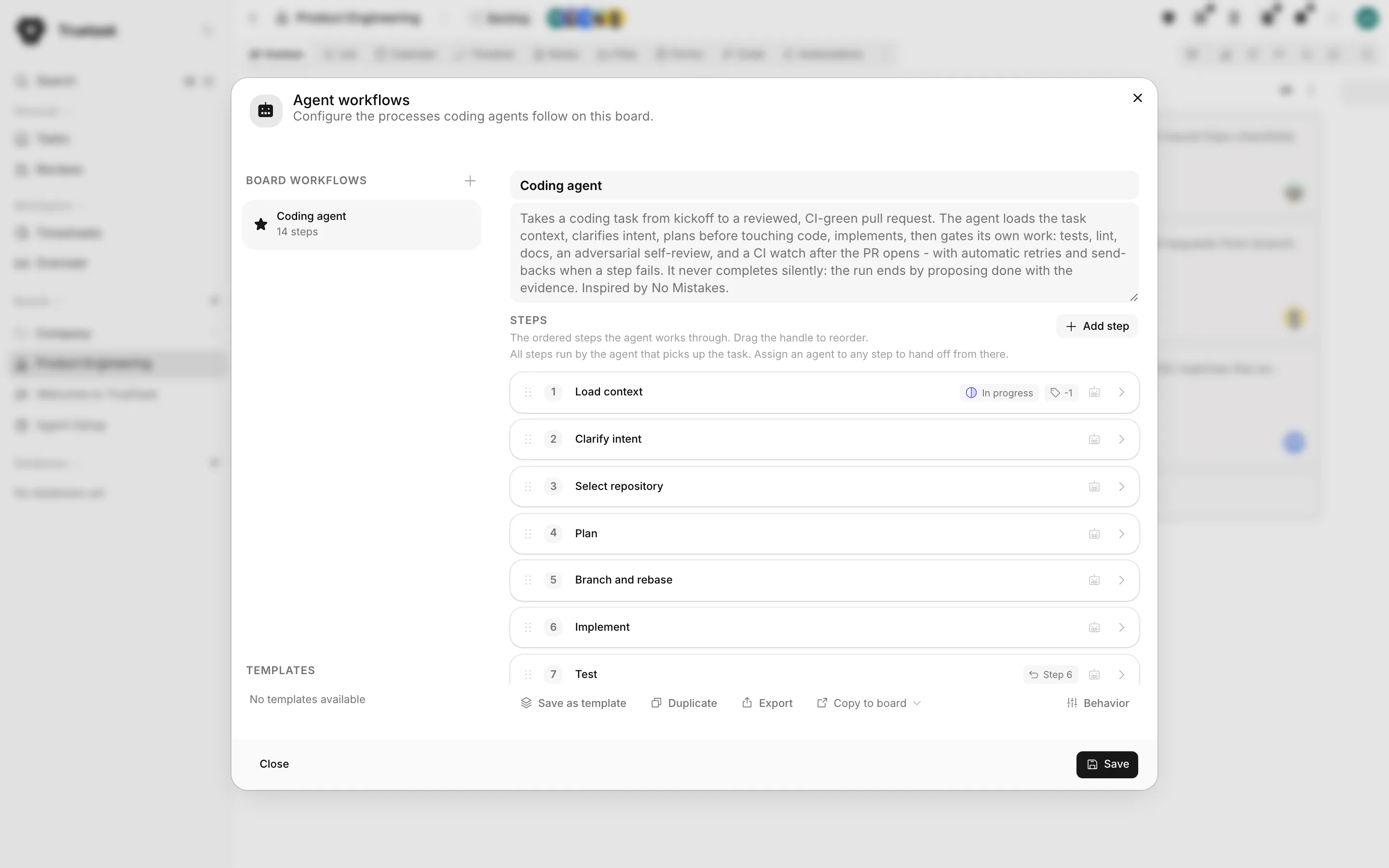
The dialog
Board workflows lists the workflows this board has. One of them carries the Default badge, and Set default moves it. The default is the workflow a kickoff uses when nobody picks one.
Three ways to get a workflow onto a board.
| Action | What it does |
|---|---|
| Add built-in workflow | Puts an editable copy of one of Truetask's ready-made processes on this board. The built-in itself never changes and can be added again anytime. |
| Create empty workflow | A blank workflow you fill in yourself. |
| Templates then Add to board | Copies one of your workspace templates onto this board. |
Each workflow has a Workflow name, a When to use description, and its Steps.
Steps
Add step appends a step; the drag handle reorders them, and Move up, Move down and Remove step are on each one.
| Field | What it is |
|---|---|
| Step name | What humans read on the run timeline. |
| Step key | A stable identifier used in run logs and progress tracking. Lowercase words joined by underscores, for example run_tests. Generated from the name if left blank, and worth keeping stable across edits. |
| Instructions | What the agent should do in this step. This is the part of the contract it follows. |
| Step agent | Which agent owns the step. |
Who owns a step
Leave Step agent empty and the step inherits the nearest assigned step above it, shown as "Inherited" followed by that agent's name. With nothing assigned above, it belongs to the Kickoff agent, whoever picked the task up.
A workflow with no agents anywhere says so: "All steps run by the agent that picks up the task. Assign an agent to any step to hand off from there." The moment two steps have different owners, the run hands off between them automatically at the boundary, and the step shows "Hands off to" the next agent.
Task effects
Card effects on a step say what happens to the task when the agent enters it.
- A list to move the task to, or Leave in place.
- Add tags and Remove tags.
Leave everything empty and the step does not touch the task. Effects re-apply when a send-back or a retry re-enters the step.
If this step fails
If this step fails is the per-step failure policy, and it runs automatically so an agent never orchestrates its own retries.
Pick the retries first: Don't retry, Retry once, or retry a set number of times. Then say what happens after that: Fail the run, or send the run back to an earlier step you name.
A send-back posts the failure reason to the task and returns the run to that earlier step so the work is redone. After 3 automatic round trips the run fails instead of looping. The send-back target must be an earlier step; if you remove it, the step shows Fix fallback until you choose another.
Run outcomes
Run outcomes does for the end of the run what effects do for a step. When the run lands in one of these states, the task moves and its tags change.
The states are Completed, Failed, Cancelled, Blocked and Needs input. Add only the outcomes you need.
Handoff: how the next agent gets started
When a step hands off to a different agent, On handoff to this agent decides how that agent is woken up.
| Mode | What happens |
|---|---|
| Notify the team | The agent's owner gets a notification and the task shows a copy-kickoff button. A human starts the session. |
| Call a launch URL | Truetask posts the run, the step and the agent to your runner, which starts that agent's session on its own. |
| Run an automation | A board automation on the Agent Handoff trigger reacts: send an email, call an endpoint, whatever you build. |
The agent's owner is notified either way, so a manual pickup always works.
Launch URLs are readable
Board members can read a step's launch URL, so never put a secret in it. Truetask signs the call with the step's own signing secret instead.
Build a handoff automation opens the automation builder with the handoff trigger and its placeholders ready. See Automation triggers.
Templates, archive, export
Save as template promotes a board workflow to a workspace template, so other boards can pick it up. Templates can be renamed and deleted; deleting one is permanent, and workflows already created from it are not affected. Copy to board sends a workflow straight to another board.
Archive stops a workflow appearing on this board while existing runs keep their saved snapshot. Archived, with its count, opens the list, where you can Restore one or delete it permanently.
Deleting a workflow is permanent too. Past runs are not affected: each run keeps its own copy of the steps.
Export and import
Export downloads a workflow as JSON you can import on any board. Three switches decide what travels.
| Option | What it includes |
|---|---|
| Include hand-off launch settings | How each agent gets started when a step hands off: launch webhooks and Agent Handoff automations. |
| Include launch URLs | The exact addresses Truetask calls on handoff. Leave off to share the workflow without your runner's endpoints. |
| Include list and tag mappings | Where steps and run outcomes move the task and which tags they set, by name. |
Signing secrets never leave the workspace, whatever you choose.
Import workflow always shows a Review import step before anything lands. It raises safety warnings when the file calls external launch URLs or relies on an Agent Handoff automation, lets you decide whether to import the launch URLs, maps each agent name to an agent on this board (or leaves those steps unassigned), and maps each list and tag name to this board, creating it or skipping the effect.
Built-in workflows
Ten ready-made processes ship with Truetask, in six categories.
| Category | Workflow | What it does |
|---|---|---|
| Coding | Coding agent | Takes a coding task from kickoff to a reviewed, CI-green pull request: load context, clarify, plan, implement, then gate the work with tests, lint, docs, an adversarial self-review and a CI watch. |
| Coding | Vibe coding | The vibe loop: load, clarify, plan, build, verify, self-review, propose done with evidence. The agent works in the local checkout however it likes, with no PR steps and no CI watch. |
| Coding | Quick fix | For small, obvious changes: load the task, make the fix, verify it, propose done. Git stays local and there is no planning ceremony. |
| Debugging | Bug squashing | Reproduces the bug first, ideally as a failing test, traces it to the root cause, makes the smallest fix, and proves it with the same reproduction before the usual gates. |
| Review | Code review | Reviews a change instead of writing one: read the whole diff, restate what it claims to do, then check out the change, run tests and lint, and post inline comments and a verdict. |
| Triage | Triage | Turns a raw report into an actionable task: hunt duplicates, assess kind and severity, ask the reporter for what is missing, then tag, prioritize and route it. It never works or completes the task. |
| Research | Research report | Answers a question with evidence: pin the question down, gather findings with sources, cross-check every load-bearing claim, then write the report into a linked note. |
| Operations | Checklist executor | Runs a process the team already wrote down. The task's checklist is the procedure; the agent reads it all first, asks its questions in one batch, and ticks a box only with evidence. |
| Operations | Status report | Writes the recurring status note: read the board as it stands and as the previous run left it, then report the delta with every line traceable to a task or a comment. |
| Operations | Source watch | Watches a set of sources and reports only the difference against what the previous run recorded, naming the sources it could not reach. The first run is the baseline. |
Every one of them proposes done rather than completing silently.
Agent behavior
Steps say what to do. Agent behavior says how. Open the board page menu, then Board setup > Agent behavior.
Behavior is set per workflow: pick the workflow at the top, and the defaults match Truetask's standard behavior.
| Setting | Options |
|---|---|
| Git branch | Only if a PR/issue is linked, Always create one, Never, Agent decides |
| Pull request | Open when ready, Only if an issue is linked, Never (human opens), Agent decides |
| Structured run | Required, Optional, Off |
| When blocked | Ask and stop, Prefer autonomy, Never stop |
| Definition of Done | Auto-propose if missing, Require up front, Ignore |
| Work brief | Draft if missing, Require before work, Ignore |
| Progress updates | At checkpoints, Every step, Silent |
| Checklist | By assignment, Only mine, Only unassigned, Everything |
| Working note | Required, Optional |
| Move cards | Agent moves them, Leave to humans |
Work brief is the description's Current behavior, Desired behavior and Out of scope sections plus the definition of done.
Desktop permissions
Three more settings apply when a workflow starts an agent on someone's computer.
- Desktop permissions: Ask every time (commands and edits wait for a person), Accept edits (file edits are approved automatically, commands still ask), or Autonomous (every tool call is approved automatically, only inside the board's mapped folder).
- Permission timeout (minutes): an unanswered permission becomes a task question at half this time and stops the run at the full time. 0 turns it off.
- Continue rounds: how many times a desktop turn keeps going when the agent hits its per-turn request limit.
Autonomous needs a mapped folder
Autonomous is scoped to the board's mapped folder. A session with no mapped folder runs one rung tighter, at Accept edits, and the chat says so. Only a board admin's setting counts.
Guardrails are not here
Autonomy guardrails on the same dialog is a reminder, not a control. Completing, archiving, deleting and merging are per-agent hard limits set on the agent account, and a blocked action fails and hands off to a human. Manage agents takes you to the Agents dialog.
What the agent actually receives
The steps, the behavior settings and the task's own state are assembled into a contract the agent reads before it starts. That contract is authoritative, and it is what the agent protocol describes.