

Appearance
Pipelines
A pipeline chains tasks so your agents work them in order. It is yours: you build it, and its tasks can sit on any of your boards. Starting it kicks off the first tasks and starts each later one the moment the tasks before it are done.
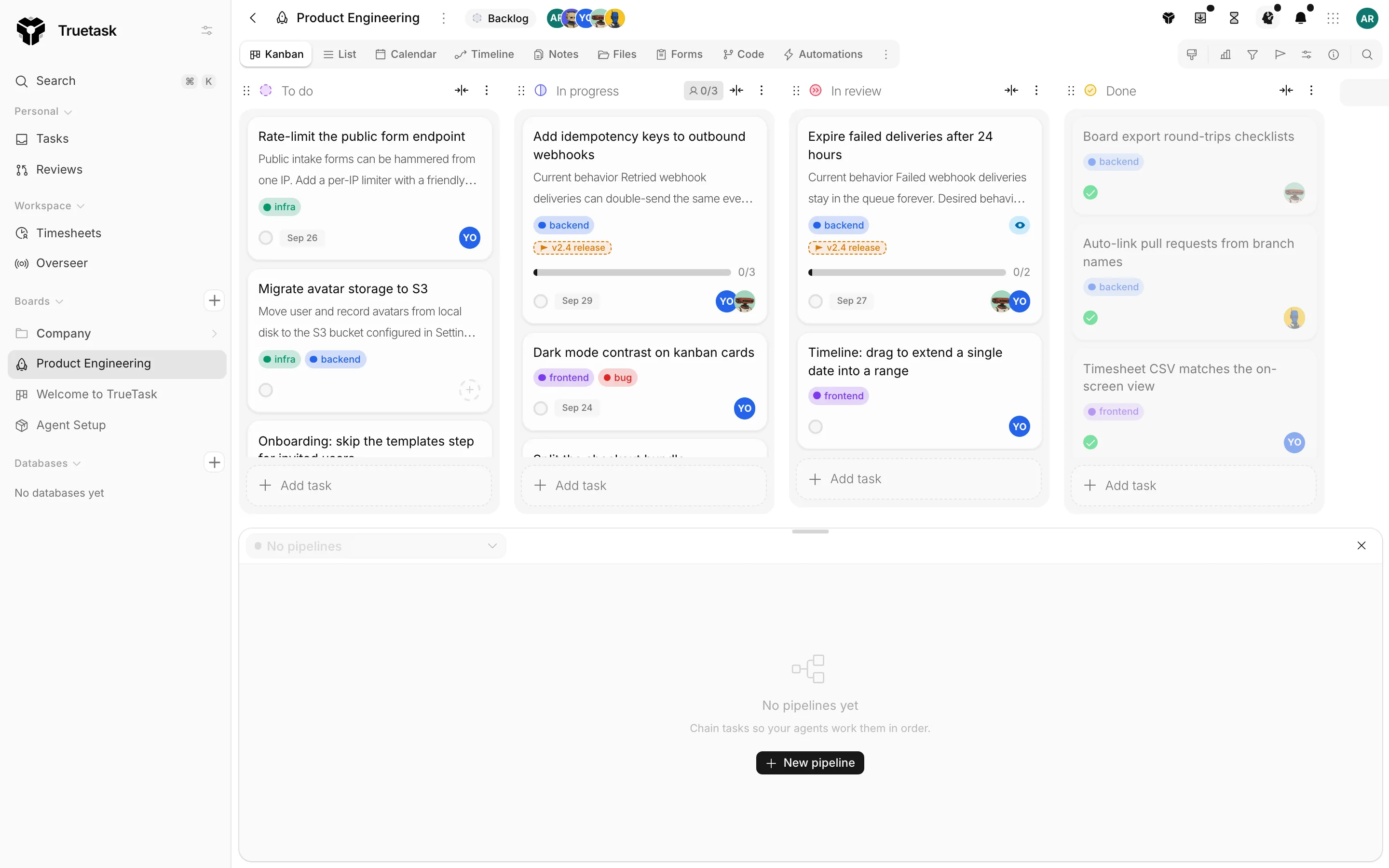
Opening the drawer
There is one pipeline canvas and it is available on every route.
- Press P.
- Open the App menu and choose Pipelines under Interface.
- Open Agent activity in the top bar and use Open pipelines.
The drawer has a switcher for moving between pipelines, and New pipeline to start another. An empty drawer says "No pipelines yet. Chain tasks so your agents work them in order."
Building one
Add task searches every task you can reach, grouped by board, and offers to create one where nothing matches, naming the title you typed and the board it would land in. Filters narrow the picker by Assigned to me, Status and Tag.
You can also build a pipeline from tasks you already have. Select tasks on a board, right-click, and use Add to pipeline: New pipeline or Add to an existing one. From a multi-task selection you also get New pipeline, in this order and New pipeline, in parallel. Dragging tasks onto the drawer works too, and the drop bar says where they will land.
Order is steps
A pipeline is a column of steps. Tasks in the same step run together; each step waits for the step before it.
Drag a task and the drop target tells you what you are about to say: it has to run after a named task, before a named task, Runs alongside, or New step. A task locked by a real dependency says Locked by a dependency, because the order is the tasks' own dependency edges, not a separate list.
That is also why a pipeline knows about work outside itself. A node can report that it is blocked by tasks outside this pipeline, or that tasks outside wait for it, with Add them to bring those tasks in so the pipeline can run them.
Binding a task
Click a node to open its panel. Setup holds the bindings.
| Field | What it sets |
|---|---|
| Agent | Who works this task. Leave it and the node follows the task before it: "Follows the task before it. Pick here to set this task by hand." |
| Model | The model the agent runs with. |
| Effort | How hard the agent thinks. Higher is slower and more thorough. |
| Agent workflow | The steps the agent follows on this task. Needs an agent first. |
Models appear once a desktop app has run this agent. If you pick an agent that is not on the task's board, the panel says the agent has no access to that board and tells you to pick another agent or ask its owner to join the board.
Behavior holds the rest.
| Setting | What it does |
|---|---|
| Start automatically | Kick off the agent as soon as this task is unblocked. |
| Review | Follow pipeline, Approve automatically, or Wait for my review. |
| Disabled | Skipped when the pipeline runs. The tasks after it wait for the tasks before it, exactly as if it were done. |
Automations attaches on-demand board automations to the node, On start and On done. They never hold up the next task.
The panel's More menu carries Open task, Open in chat, Copy agent kickoff, Break down with AI and Remove. Selecting several nodes turns the panel into a batch editor: changes apply to every selected task, and fields that differ read Mixed.
Running it
Start kicks off every head task. The toast tells you how many went out.
| Control | What it does |
|---|---|
| Pause | Stops starting new tasks. Tasks already running keep going. |
| Resume | Carries on. |
| Cancel pipeline | Stops the pipeline. |
| Re-run | Reopens every task and runs the agents again. It asks first. |
| Delete pipeline | Removes the pipeline. Its tasks stay on their boards. |
On a single node, Run now hands the task to its agent immediately without waiting for its turn, and Cancel kickoff puts a task the agent has not picked up yet back to ready. A finished node offers Run again.
A node that cannot run says why: it is skipped, it is awaiting approval, the board has no workflow yet, the agent is already on this task, or it is already done. Before you start, Not ready yet lists the tasks missing an agent or whose agent has no access to the board.
Statuses
The pipeline carries one of these.
| Status | Meaning |
|---|---|
| Draft | Not started yet. |
| Running | At least one task is in flight. |
| Waiting | Nothing to start right now. |
| Paused | You paused it. |
| Needs attention | A task needs a human before the pipeline moves on. |
| Complete | Every task is done. |
| Cancelled | You cancelled it. |
Each node carries its own state: Ready to start, Waiting for the agent, Handed to the agent, Working, Needs attention, Awaiting approval, Blocked by a count of tasks, Waits for a count of tasks, Paused, Done, Skipped, Cancelled or Task removed. A node in trouble shows a banner saying which: the run failed, the run was cancelled, the agent has a question, the agent is blocked, or the agent went quiet.
When a kickoff waits
A node that has been handed to an agent but not picked up explains the delay.
- "Sign in to the coding tool on your desktop to start this agent."
- "No computer is online for this agent right now. It starts as soon as one connects."
- "The computer may be asleep: keep awake is off in the desktop app."
- "No folder is mapped for this board on that computer, so it runs with Accept edits."
See Desktop agents for the settings behind those lines.
Needs a human
"Needs attention" is the pipeline's word for a decision only you can make. It covers an agent question, a done proposal waiting for review, a failed run, and a run that went silent. Until you deal with it, the pipeline does not move past that task.
Auto-approve reviews changes one of those. With it on, agents continue without waiting for your approval, and you are still notified. Per node, Review overrides the pipeline: Wait for my review keeps the gate on one task even when the pipeline approves automatically.
On the task itself
A task that belongs to a pipeline carries a chip reading "In pipeline" with the pipeline's name, and its frame has a Pipeline section with Open pipeline. That is the same drawer, focused on that pipeline.
Through the API
Pipelines are fully scriptable. The MCP server exposes seventeen pipelines_* tools, including pipelines_create, pipelines_start, pipelines_pause, pipelines_resume, pipelines_cancel, pipelines_connect, pipelines_disconnect, pipelines_kick_node, pipelines_from_cards and pipelines_chain. See MCP: connect any AI tool and Agent protocol.
Pipelines need AI turned on
The pipeline drawer appears when AI features are enabled for your workspace and for you. See Models and providers.