

Appearance
Databases
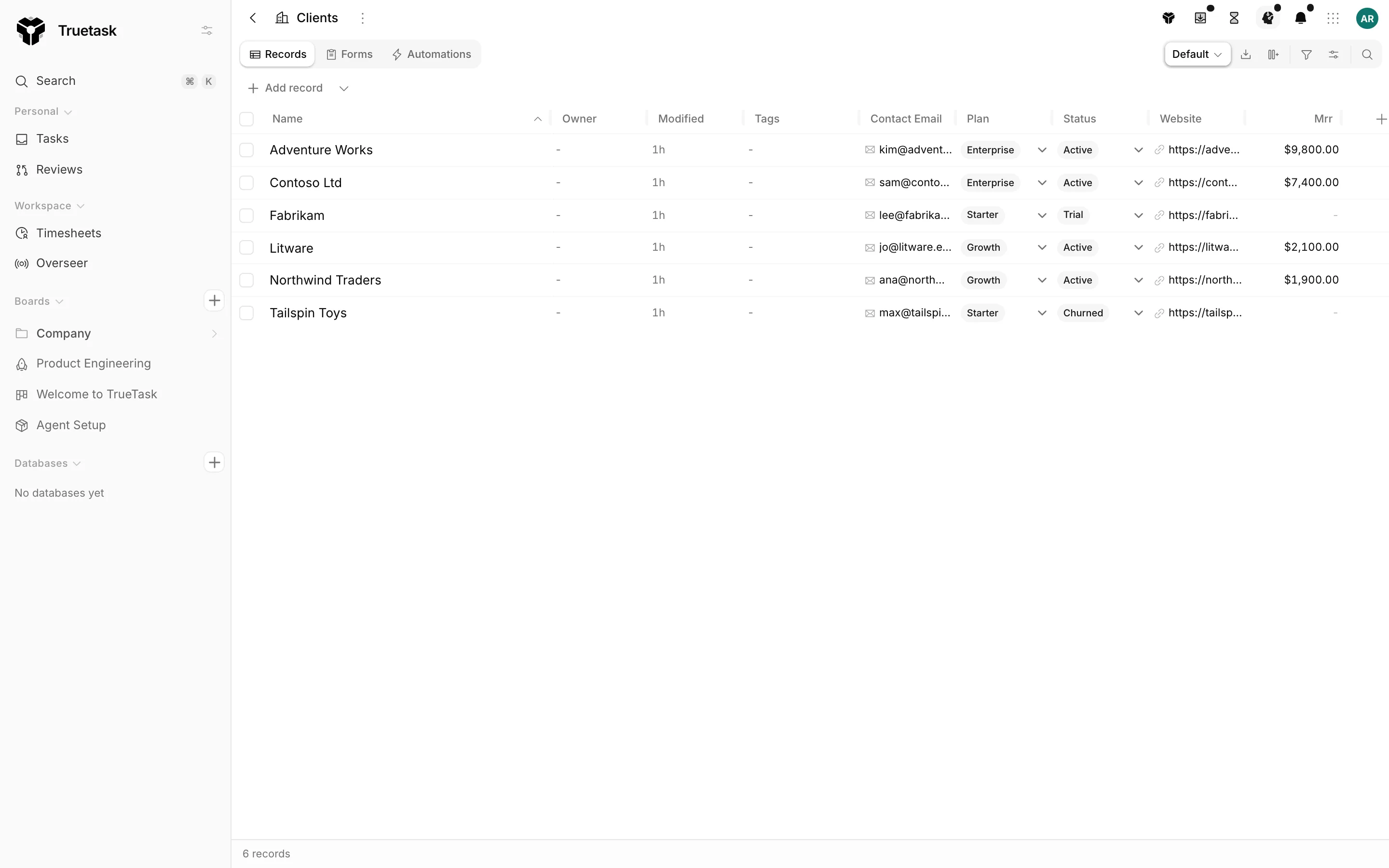
A database is a board that holds records instead of tasks. It gives your workspace one shared table of clients, assets, contacts or anything else, and lets other boards link to it instead of retyping the same names.
Creating a database
Open the App menu and choose New database (Alt+D). You can also use Add database or folder, the + on the Databases section of the sidebar, or pick the Database tile on the Start step of the new board wizard.
Databases live in the sidebar's own Databases section, in their own folders, separate from the Boards tree.
Seven built-in database templates ship with Truetask: Contacts, Companies, Customers, Positions, Assets, Inventory and Suppliers. See Board templates.
What is different
A database has no task semantics, so a lot of the board machinery is simply absent.
| Task boards have | Databases |
|---|---|
| Lists you arrange into flow lanes | One flat Records list. No flow, no lanes, no WIP limits. |
| Nine views | Records (the table), Forms, and Automations for board admins. Fixed: no personal override can widen or narrow it. |
| Priority, dates, milestones, dependencies, votes | None of them, on the table, in the filters or in the stats. |
| Board details and Overseer reporting | Neither. A database is not portfolio scope. |
| A Code view and agent workflows | Neither. |
The wording changes too: the Title column reads as Name, Members reads as Owner, and the status bar counts records. A record can also carry a picture, shown as an avatar beside its name. That is off until the board's field layout turns it on, either always or only once a picture is uploaded.
The page menu keeps the board lifecycle plus the fields, the forms and the digests: Clone database, Save as Template, Import records, Custom fields, Database setup, Restore records, Archive database and Delete database.
The records table
The Records view is the List view with the task columns removed. Fields are the columns: add one from the board tools tray, reorder, resize, hide, group, sort and edit in place exactly as on a task board. See List and Custom fields.
Add record at the bottom of the table creates a row with just a name. To fill in everything at once, use the record sheet or a form.
The record sheet
Every board already carries the shape of its records: the field layout says which fields show, in what order, in which groups, and whether a field appears always, only once it holds a value, or never.
Truetask turns that shape into a create surface without you authoring anything. The name is pinned and required, the pinned rows follow the layout's rules, custom fields follow their sections and their show rules, computed fields are skipped, and a relation joins in as a picker when it points at one specific board.
Because it is not a real form, nothing is counted as a submission and nobody is notified.
Linking a board to a database
On a task board, add a relation custom field pointing at the database. A task then carries a cell like Client: Netflix, picked from the database's records rather than typed.
The relation field decides what happens when the record you need is not there yet. Its create option is either the target board's default form, its own record sheet, a specific form, or nothing at all, and the picker offers a quick-create row accordingly.
Board-scoped relation fields work the same way, so a whole board can be tied to one client. See Custom fields and Boards.
New record from the linking board
When a board's relation fields point at databases, its page menu grows a New record submenu with one row per database. Picking one opens that database's form or its record sheet right where you are, so you never have to leave the board you are working on.
Rollups
Once the link exists, a rollup field on either side aggregates across it: count the linked records, sum or average one of their fields, take the earliest or latest date, or report the share that are done. That is how a Companies database ends up with a spend-this-year column, or an Items database with a quantity on hand.
See Custom fields.
Importing records
Import records in the page menu brings rows in from a file. Map the spreadsheet's columns onto the database's fields and Truetask writes the records as you.
Behind it, the import runs in chunks of up to 500 records per request. Values are matched by field name, and a relation cell is matched to a target record by its title, so a Supplier column of company names wires itself up. Tags that do not exist yet are created. Rows the importer cannot fully resolve come back as warnings rather than failures, and the wizard reports how many links it could not match.
See Importing.
Forms
A database's Forms view works exactly like a task board's: build a public intake form and every submission becomes a record. That is how a Contacts database collects sign-ups or a Support queue collects tickets. See Forms.
Deleting a database
A database that another board's relation field points at cannot be deleted until those fields are removed, and the dialog names the boards that are holding it.
The reverse also holds: deleting a board offers to take along the databases only it uses, and names the ones another board still links. See Boards.
Related
- Custom fields for relation and rollup fields
- Board templates for the built-in databases and the bundles that wire them up
- List for the table this view is built on
- Importing for loading records from a file