

Appearance
Code review
Truetask has a full review surface, so a pull request linked to a task can be read, commented on and decided without leaving the board. Reviews post to the provider, so the rest of your team sees them where they expect.
Where a review starts
| Entry point | Where |
|---|---|
| The eye pill next to a task's key | The task header, when the task has linked pull requests. With several, the pill shows the count and opens a picker. |
| Open review on a row | The board's Code view and the task's Code tab |
| A row on the Reviews page | /reviews |
All three open the same drawer. It is mounted once for the whole app, so it works from a task, from a board you have open, and from the cross-board inbox alike.
The review drawer
The drawer opens on the right. Drag its left edge to resize it, or use Full screen for a wide diff.
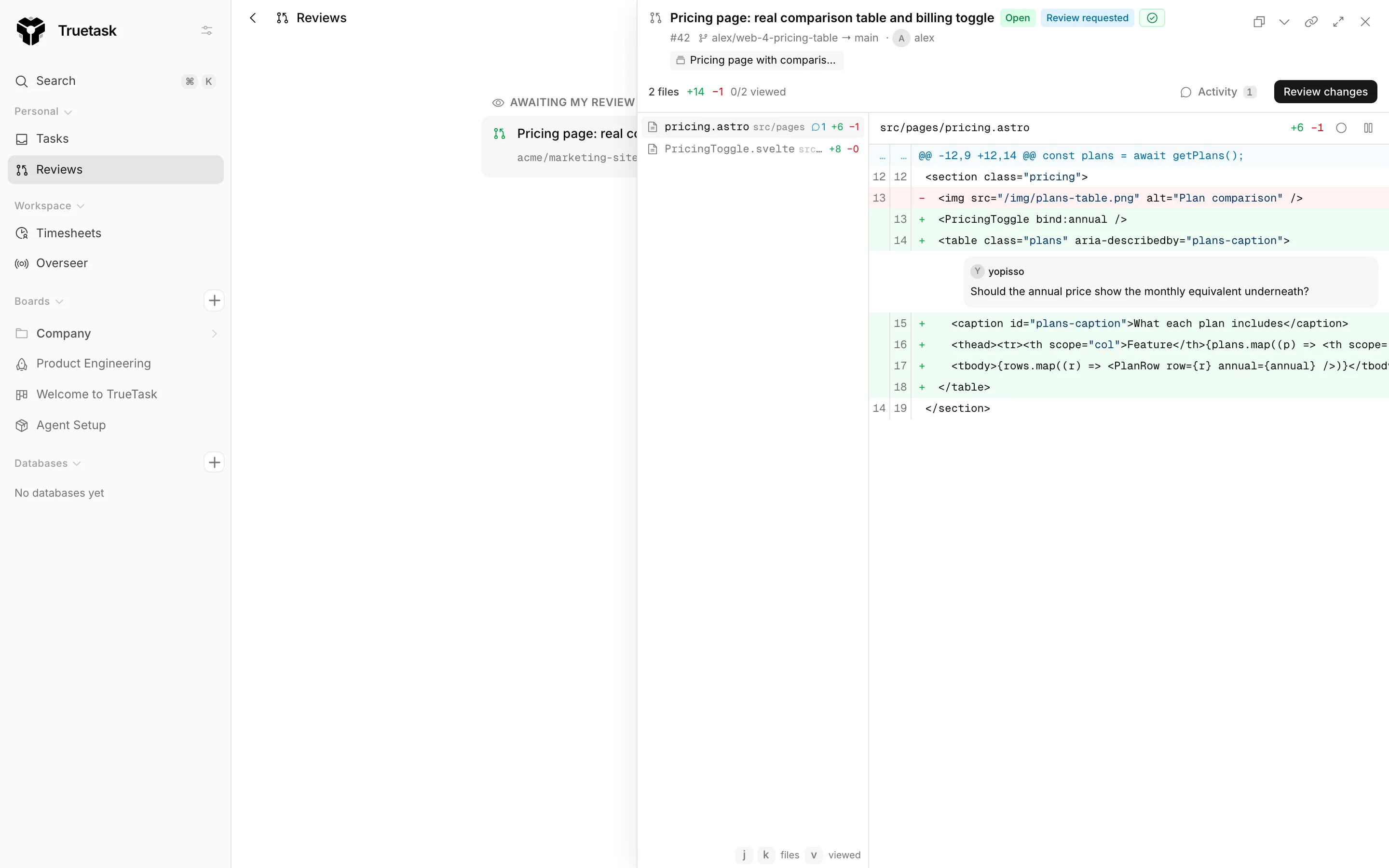
The header carries the pull request's title (which opens it on the provider), its state, its review state, the CI badge, its number, the branch pair, the author, and chips for the tasks it is linked to or referenced from.
Below that sits the change summary: the file count, additions, deletions, and how many files you have marked viewed.
Reading the diff
Files are listed on the left, the diff on the right.
| Key | Does |
|---|---|
| j | Next file |
| k | Previous file |
| v | Mark the current file viewed, or unmark it |
| Esc | Close the drawer, or close an open popover first |
Keys stand down while you are typing. Viewed state is remembered per pull request, so a long review survives closing the drawer.
Each file can be shown as a Unified view or a Split view, and can be marked viewed from its own header. Binary files are named but not rendered, and a very large diff is truncated rather than dropped.
Inline comments
Hover a line's number gutter and add a comment. It is held as Pending until you submit the review, and the drawer counts pending comments for you. Pending comments and your review note are saved per pull request, so closing the drawer or switching to another pull request never discards an unfinished review.
Comments on lines that are not shown in the visible diff are reported as a count, and comments on outdated lines are marked Outdated.
Submitting
Review changes opens the finish popover: your pending comments with a jump link and a remove button, the verdict, and a summary note.
| Verdict | Use it for |
|---|---|
| Comment | Feedback without a decision |
| Approve | Sign off |
| Request changes | Send it back |
A review needs either a note or at least one inline comment before it can be submitted. Everything goes to the provider in one submission.
Activity
Activity opens the pull request's conversation: its comments and review events, with a box to post a new comment. That comment posts to the pull request on the provider, not to the Truetask task.
Viewers get a read-only drawer: the diff, the conversation and past reviews, without the comment box or the verdicts.
The Reviews page
Reviews in the sidebar's Personal section is a cross-board inbox of pull requests that concern you. It appears when you are on at least one git-connected board and the Code & reviews feature is on.
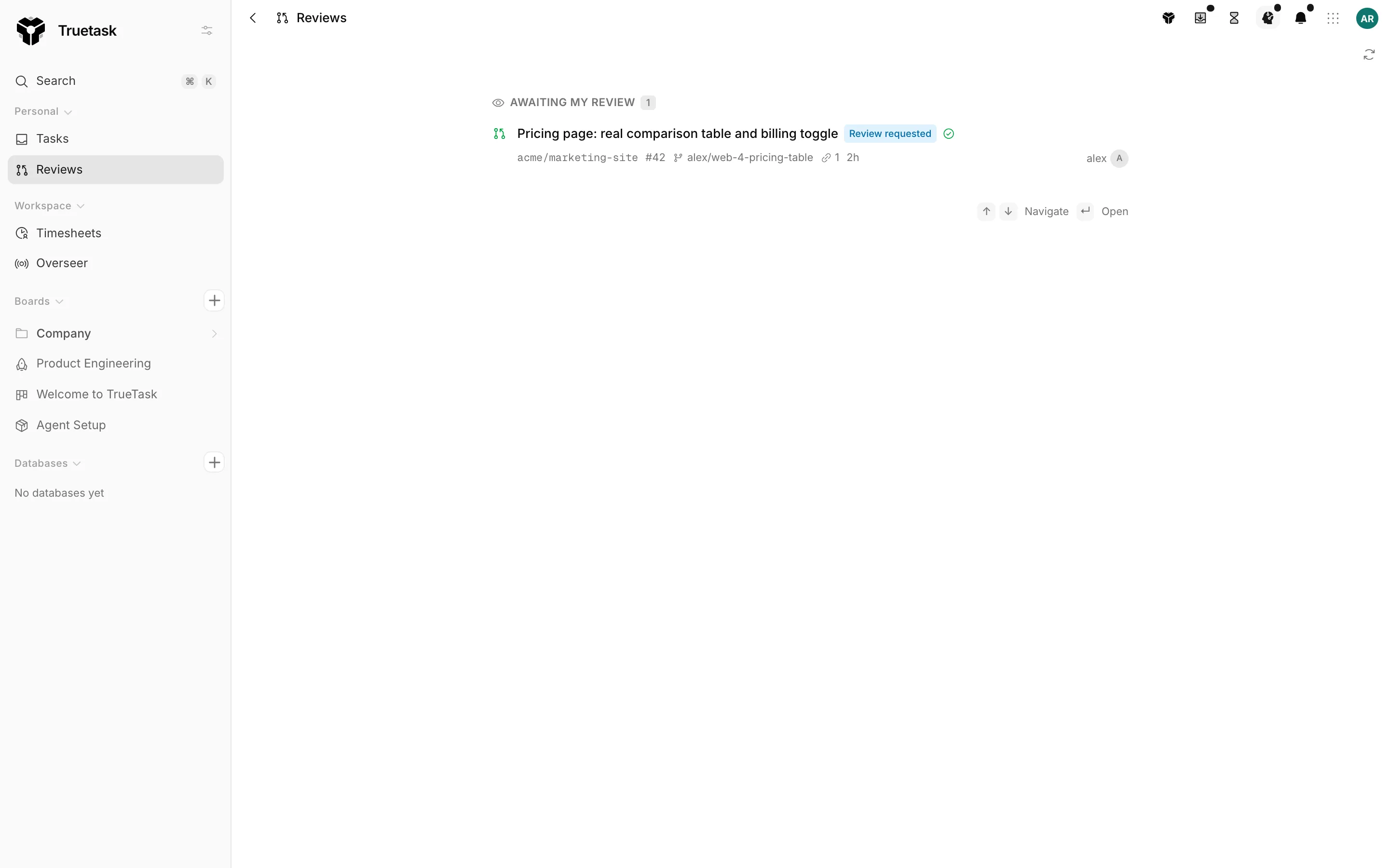
It has two groups: Awaiting my review and Authored by me. Rows show the state, the review state, the CI badge, the repository, the branch and how long ago it moved.
| Key | Does |
|---|---|
| j or Down | Next row |
| k or Up | Previous row |
| Enter | Open the review drawer |
Each row also carries the coding tool button, so you can pull the branch down locally in one click.
The inbox is resolved through the git team mapping. If your git identity is not mapped, the page says No Git identity mapped and offers the fix: admins land in the git settings, everyone else lands on their own provider account dialog. See Connect a repository for both.
Preferences
Review and coding-tool defaults are personal, not workspace-wide. Open the avatar menu and choose Code tools to set your preferred tool, which tools appear in the menu, the shape of the generated prompt, and what happens when a launch is not possible. See Coding tools.
Agents that review
Reviewing is one of the things agents are good at, and Truetask ships a built-in workflow for it.
Code review reads the whole diff, restates what the change claims to do, then judges it against that intent: correctness, security, and whether the tests actually test anything. It checks the change out, runs tests and lint itself, and exercises the changed behavior before posting inline comments and a verdict on the pull request.
Agents reach git through the same API you do. The MCP server exposes 52 git tools, covering issues, pull requests, diffs, reviews, comments, labels, assignees, milestones, branches, merges, label mappings and user mappings. See Agent workflows and MCP.
Merging
Truetask does not merge from the review drawer. Merge on the provider, from an automation, or with an agent using the git tools.
Either way the repository's CI gate applies: with Block failed CI or Block failed or pending CI set, a merge through Truetask is refused while the gate is red, unless the repository allows an admin bypass and the person merging is a board admin. See Branches, issues and pull requests.